
Hyundai Santa Fe (TM): Driving Safety / Driver Attention Warning (DAW)
Basic function
Driver Attention Warning will help determine the driver's attention level by analyzing driving pattern, driving time, etc. while vehicle is being driven. The system will recommend a break when the driver’s attention level falls below a certain level.
Leading Vehicle Departure Alert function
Leading Vehicle Departure Alert function will inform the driver when a detected vehicle in front departs from a stop.
Detecting sensor

[1] : Front view camera
The front view camera is used to detect driving patterns and front vehicle departure while vehicle is being driven.
Refer to the picture above for the detailed location of the detecting sensor.
CAUTION
Always keep the front view camera in good condition to maintain optimal performance of Driver Attention Warning.
For more details on the precautions of the front view camera, refer to “Forward Collision-Avoidance Assist (FCA)� section in chapter 7.
System settings
Setting functions for the system
Driver Attention Warning

With the engine on, select ‘Driver Assistance → Driver Attention Warning (or DAW (Driver Attention Warning))’ from the Settings menu to set whether or not to use each function.
-- If ‘Inattentive Driving Warning’ (or ‘Swaying warning’) is selected, the system will inform the driver of the driver’s attention level and will recommend taking a break when the level falls below a certain level.
Leading Vehicle Departure Alert
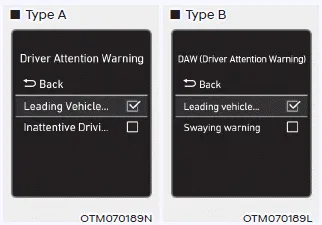
-- If ‘Leading Vehicle Departure Alert’ is selected, the system will inform the driver when the front vehicle departs from a stop.
Warning Timing
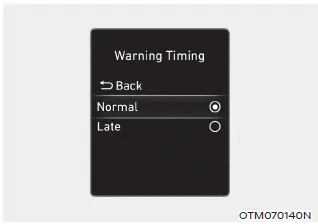
With the engine on, select ‘Driver Assistance → Warning Timing’ from the Settings menu to change the initial warning activation time for Driver Attention Warning.
When the vehicle is first delivered, Warning Timing is set to ‘Normal’. If you change the Warning Timing, the warning time of other Driver Assistance systems may change.
Information
If the engine is restarted, Driver Attention Warning will maintain the last setting.
System operation
Basic function
System display and warning
The basic function of Driver Attention Warning is to inform the driver of their ‘Attention Level’ and to warn the driver to ‘Consider taking a break’.
Attention level
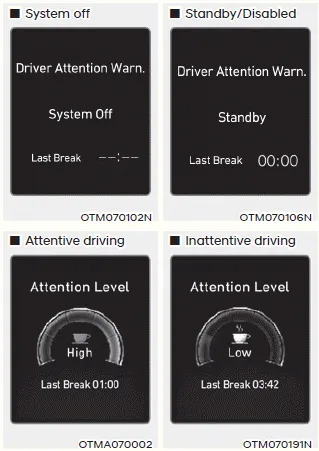
- The driver can monitor his/her driving conditions on the cluster.
-- When the ‘Inattentive Driving Warning’ is deselected from the Settings menu, ‘System Off’ is displayed.
-- The system will operate when vehicle speed is between 0~110 mph (0~180 km/h).
-- When vehicle speed is not within the operating speed, the message ‘Standby’ (or 'Disabled') will be displayed. - The driver’s attention level is displayed on the scale of 1 to 5. The lower the level is, the more inattentive the driver is.
- The level decreases when the driver does not take a break for a certain period of time.
Taking a break
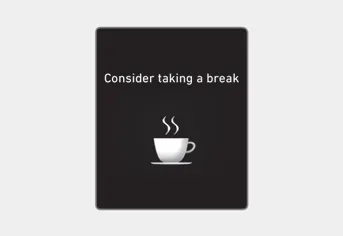
- The ‘Consider taking a break’ message will appear on the cluster and an audible warning will sound to suggest that the driver take a break, when the driver’s attention level is below 1.
- Driver Attention Warning will not suggest a break when the total driving time is shorter than 10 minutes or 10 minutes has not passed after the last break was suggested.
WARNING
For your safety, change the Settings after parking the vehicle at a safe location.
CAUTION
- Driver Attention Warning may suggest a break depending on the driver’s driving pattern or habits, even if the driver doesn’t feel fatigued.
- Driver Attention Warning is a supplemental system and may not be able to determine whether the driver is inattentive.
- The driver who feels fatigued should take a break at a safe location, even though there is no break suggestion by Driver Attention Warning.
Information
- You may change settings from the instrument cluster (User Settings) or infotainment system (Vehicle Settings), whichever option that is provided with your vehicle. For more details, see "User Settings" section in chapter 4, or "Vehicle Settings" section in supplied Infotainment Manual.
- Driver Attention Warning will reset the last break time to 00:00 in
the following situations:
-- The engine is turned off
-- The driver unfastens the seat belt and opens the driver’s door
-- The vehicle is stopped for more than 10 minutes - When the driver resets Driver Attention Warning, the last break time is set to 00:00 and the driver’s attention level is set to High.
Leading Vehicle Departure Alert function
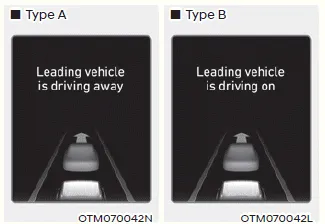
When the front vehicle departs from a stop, Leading Vehicle Departure Alert will inform the driver by displaying the ‘Leading vehicle is driving away’ (or ‘Leading vehicle is driving on’) message on the cluster and an audible warning will sound.
WARNING
- If any other system’s warning message is displayed or audible warning is generated, Leading Vehicle Departure Alert's warning message may not be displayed and audible warning may not be generated.
- The driver should hold the responsibility to safely drive and control the vehicle.
CAUTION
- Leading Vehicle Departure Alert is a supplemental function and may not alert the driver whenever the front vehicle departs from a stop.
- Always check the front of the vehicle and road conditions before departure.
System malfunction and limitations
System malfunction

When Driver Attention Warning is not working properly, the ‘Check Driver Attention Warning (DAW) system’ warning message will appear on the cluster. If this occurs, we recommend that the system be inspected by an authorized HYUNDAI dealer.
Limitations of the system
Driver Attention Warning may not work properly in the following situations:
- The vehicle is driven violently
- The vehicle intentionally crosses over lanes frequently
- The vehicle is controlled by Driver Assistance system, such as Lane Keeping Assist
Leading Vehicle Departure Alert feature
• When the vehicle cuts in
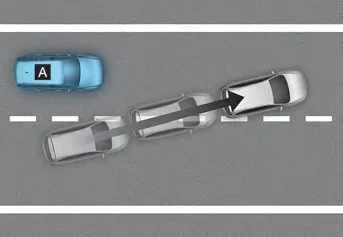

[A] : Your vehicle, [B] : Front vehicle
If a vehicle cuts in front of your vehicle, Leading Departure Alert may not operate properly.
• When the vehicle ahead sharply steers

[A] : Your vehicle, [B] : Front vehicle
If the vehicle in front makes a sharp turn, such as to turn left or right or make a U-turn, etc., Leading Vehicle Departure Alert may not operate properly.
• When the vehicle ahead abruptly departures

If the vehicle in front abruptly departures, Leading Vehicle Departure Alert may not operate properly.
• When a pedestrian or bicycle is between you and the vehicle ahead

If there is a pedestrian(s) or bicycle(s) in between you and the vehicle in front, Leading Vehicle Departure Alert may not operate properly.
• When in a parking lot
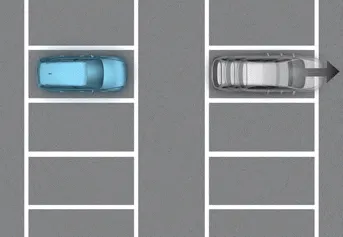
If a vehicle parked in front drives away from you, Leading Vehicle Departure Alert may alert you that the parked vehicle is driving away.
• When driving at a tollgate or intersection, etc.

If you pass a tollgate or intersection with lots of vehicles or you drive where lanes are merged or divided frequently, Leading Vehicle Departure Alert may not operate properly.
CAUTION
For more details on the precautions of the front view camera, refer to “Forward Collision-Avoidance Assist (FCA)� section in chapter 7.
After the vehicle stops, when an approaching vehicle from the rear area is detected as soon as a passenger opens a door, Safe Exit Assist will warn the driver with a warning message and an audible warning to help prevent a collision.
Blind-Spot View Monitor displays the rear blind spot area of the vehicle in the cluster when the turn signal is turned on to help change lanes. Detecting sensor [1], [2] : SVM-side view camera (camera located at bottom of the mirror) Refer to the picture above for the detailed location of the detecting sensors.
Other information:
Hyundai Santa Fe (TM) 2019-2023 Service and Repair Manual: Components and components location
Component Location (1) 1. Integrated Body Control Unit (IBU) 2. Buzzer 3. Door outside handle 4. Interior antenna 2 5. Door module antenna 6. Interior antenna 1 Component Location (2) 1.
Hyundai Santa Fe (TM) 2019-2023 Service and Repair Manual: Lighting System
Components and components location Component Location 1. Head lamp (Low) 2. Head lamp (High) 3. Daytime running light (DRL)/Positioning lamp 4. Turn signal lamp 5. Head lamp (ADD Low) 6. Side repeater lamp 7.
Categories
- Manuals Home
- Hyundai Santa Fe Owners Manual
- Hyundai Santa Fe Service Manual
- LCD Display
- Front Radar Unit. Repair procedures
- Rear seats
- New on site
- Most important about car
