
Hyundai Santa Fe (TM): Driving Safety / Blind-Spot View Monitor (BVM)

Blind-Spot View Monitor displays the rear blind spot area of the vehicle in the cluster when the turn signal is turned on to help change lanes.
Detecting sensor

[1], [2] : SVM-side view camera (camera located at bottom of the mirror)
Refer to the picture above for the detailed location of the detecting sensors.
System settings
Setting functions for the system
Blind-Spot View
With the engine on, select ‘Driver Assistance → Blind-Spot Safety → Blind- Spot View’ from the Settings menu to turn on Blind-Spot View Monitor and deselect to turn off the system.
System operation
Operating switch
Turn Signal switch
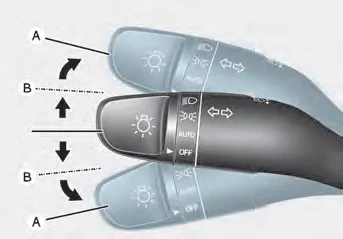
Blind-Spot View Monitor will turn on and off when the turn signal is turned on and off.
Blind-Spot View Monitor
Operating conditions
When the left or right side turn signal turns on, the image in that direction is displayed on the instrument cluster.
Off conditions
- When the turn signal turns off, the image on the instrument cluster will turn off.
- When the hazard warning flasher is on, Blind-Spot View Monitor will turn off, regardless of the turn signal status.
- When other important warning is displayed on the instrument cluster, Blind-Spot View Monitor may turn off.
System malfunction
When Blind-Spot View Monitor is not working properly, or the cluster display flickers, or the camera image does not display normally, we recommend that the system be inspected by an authorized HYUNDAI dealer.
WARNING
- The image shown on the cluster may differ from the actual distance of the object. Make sure to directly check the vehicle's surroundings for safety.
- Always keep the camera lens clean. If the lens is covered with foreign material, it may adversely affect camera performance and Blind- Spot View Monitor may not operate normally.
Basic function Driver Attention Warning will help determine the driver's attention level by analyzing driving pattern, driving time, etc. while vehicle is being driven.
Other information:
Hyundai Santa Fe (TM) 2019-2023 Service and Repair Manual: Seat Electrical
Components and components location Component Location 1. Lumber support motor (Vertical) 2. Lumbar support motor (Horizontal) 3. Reclining motor 4. Rear height motor 5. Front height motor 6. Slide motor 7.
Hyundai Santa Fe (TM) 2019-2023 Service and Repair Manual: Compressor. Description and operation
Description The compressor is the power unit of the A/C system. It is located on the side of engine block and driven by a V-belt of the engine. The compressor changes low pressure and low temperature refrigerant gas into high pressure and high temperature refrigerant gas.
Categories
- Manuals Home
- Hyundai Santa Fe Owners Manual
- Hyundai Santa Fe Service Manual
- Parking Brake System. Electronic Parking Brake (EPB)
- Fuel Delivery System
- Power Tailgate Module
- New on site
- Most important about car
