
Hyundai Santa Fe (TM): Surround View Monitor (SVM) / System settings
Camera settings
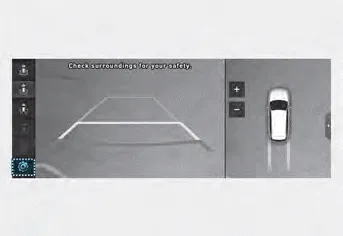
- You can change Surround View Monitor ‘Display Contents’ or ‘Display Settings’
by touching the setup icon (
 ) on
the screen while Surround View Monitor is operating, or selecting ‘Driver Assistance
→ Parking Safety → Camera Settings’ from the Settings menu while the engine
is on.
) on
the screen while Surround View Monitor is operating, or selecting ‘Driver Assistance
→ Parking Safety → Camera Settings’ from the Settings menu while the engine
is on. - In the Display Contents, you can change settings for ‘Top View Parking Guidance’, ‘Rear View Parking Guidance’ and ‘Parking Distance Warning’.
- In the Display Settings, you can change the screen’s ‘Brightness’ and ‘Contrast’.
Top View Parking Guidance
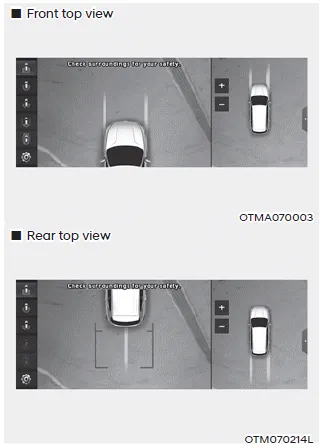
- When the ‘Top View Parking Guidance’ is selected, parking guidance is displayed on the right side of the Surround View Monitor screen.
- You may see the front top view or the rear top view when using Top View Parking Guidance.
Rear View Parking Guidance
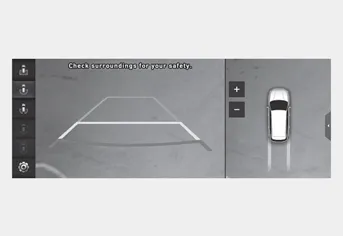
- When the ‘Rear View Parking Guidance’ is selected, parking guidance is displayed in the rear view.
- The horizontal guideline of the Rear View Parking Guidance shows the distance of 1.6 ft (0.5m), 3.3 ft (1 m) and 7.6 ft (2.3m) from the vehicle.
Parking Distance Warning
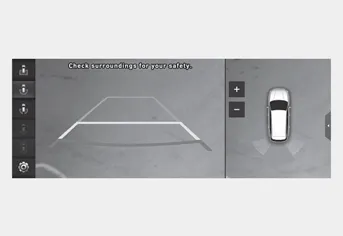
- When the ‘Parking Distance Warning’ is selected, parking distance warning is displayed on the right side of the Surround View Monitor screen.
- The image will be displayed only when Parking Distance Warning is warning the driver.
Surround View Monitor Auto On
With the engine on, select ‘Driver Assistance → Parking Safety → Surround View Monitor Auto On’ from the Settings menu to use the function.
To use this function, refer to “System Operation”.
Surround View Monitor can help assist in parking using the cameras installed on the vehicle and displays images around the vehicle through the infotainment system screen.
Operating button Press the Parking/View button (1) to turn on Surround View Monitor. Press the button again to turn off the system. Other view modes can be selected by touching the view icons (2) on the Surround View Monitor screen.
Other information:
Hyundai Santa Fe (TM) 2019-2023 Service and Repair Manual: PTC Heater (Diesel only). Repair procedures
Inspection Operating Logic Test (Manual only) Inspect the PTC operation with the confirmation logic below : 1. Entering (1) Set the mode to FLOOR. (2) Set the temperature to MAX HOT.
Hyundai Santa Fe (TM) 2019-2023 Service and Repair Manual: Mode Control Actuator. Components and components location