
Hyundai Santa Fe (TM): Parking Safety / Rear View Monitor (RVM)


Rear View Monitor will show the area behind the vehicle to assist you when parking or backing up.
Camera

[1] : Rear view camera
Refer to the picture above for the detailed location of the camera.
System settings
Camera settings
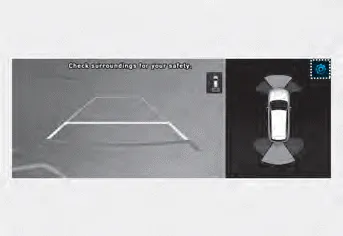
- You can change Rear View Monitor ‘Display Contents’ or ‘Display Settings’
by touching the setup icon (
 ) on
the screen while Rear View Monitor is operating, or selecting ‘Driver Assistance
→ Parking Safety → Camera Settings’ from the Settings menu while the engine
is on.
) on
the screen while Rear View Monitor is operating, or selecting ‘Driver Assistance
→ Parking Safety → Camera Settings’ from the Settings menu while the engine
is on. - In the Display Contents, you can change settings for ‘Rear View’, and in the Display Settings, you can change the screen’s ‘Brightness’ and ‘Contrast’.
System operation
Operating button
Parking/View button
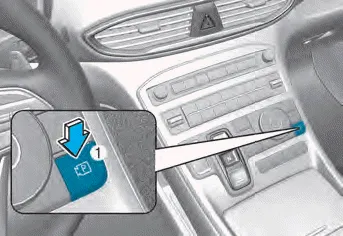
Press the Parking/View button (1) to turn on Rear View Monitor.
Press the button again to turn off the system.
Rear view
Operating conditions
- Shift the gear to R (Reverse), the image will appear on the screen.
- Press the Parking/View button (1) while the gear is in P (Park), the image will appear on the screen. However, parking guidance is not displayed.
Off conditions
- The rear view cannot be turned off when the gear is in R (Reverse).
- Press the Parking/View button (1) again while the gear is in P (Park) with the rear view on the screen, the rear view will turn off.
- Shift the gear from R (Reverse) to P (Park), the rear view will turn off.
Maintaining rear view
The rear view will maintain showing on the screen to help you when parking. However, parking guidance is not displayed.
Operating conditions
Shift the gear from R (Reverse) to N (Neutral) or D (Drive), the rear view will appear on the screen.
Off conditions
- When vehicle speed is above 6 mph (10 km/h), the rear view will turn off.
- Shift the gear to P (Park), the rear view will turn off.
Rear top view
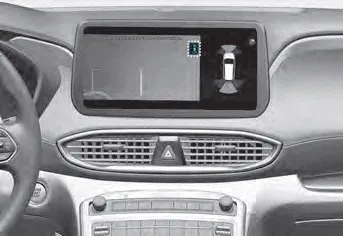
When you touch the
 icon, the top
view is displayed on the screen and shows the distance from the vehicle in the back
of your vehicle while parking.
icon, the top
view is displayed on the screen and shows the distance from the vehicle in the back
of your vehicle while parking.
System malfunction and limitations
System malfunction
When Rear View Monitor is not working properly, or the screen flickers, or the camera image does not display normally, we recommend that the system be inspected by an authorized HYUNDAI dealer.
Limitations of the system
When the vehicle is stopped for a long time in winter or when the vehicle is parked in an indoor parking lot, the exhaust fumes may temporarily blur the image.
WARNING
- The rear view camera does not cover the complete area behind the vehicle. The driver should always check the rear area directly through the inside and side view mirror before parking or backing up.
- The image shown on the screen may differ from the actual distance of the object. Make sure to directly check the vehicle's surroundings for safety.
- Always keep the rear view camera lens clean. If the lens is covered with foreign material, it may adversely affect camera performance and Rear View Monitor may not operate normally.
Surround View Monitor can help assist in parking using the cameras installed on the vehicle and displays images around the vehicle through the infotainment system screen.
Other information:
Hyundai Santa Fe (TM) 2019-2023 Service and Repair Manual: Auto Lighting Control System
Description and operation Description It's a system that uses illumination sensor to automatically turn ON the tail lamp and head lamp based on the change in surrounding environment's illumination condition. It activates when the vehicle enters/exits tunnel, or when the illumination condition in surrounding environ
Hyundai Santa Fe (TM) 2019-2023 Service and Repair Manual: Description and operation
Description and operation The System may be limited when • The radar sensor or camera is blocked with a foreign object or debris.
Categories
- Manuals Home
- Hyundai Santa Fe Owners Manual
- Hyundai Santa Fe Service Manual
- Engine Electrical System
- Horn
- Vehicle Information, Consumer Information and Reporting Safety Defects
- New on site
- Most important about car
