
Hyundai Santa Fe (TM): Convenience features / Interior features
Cup holder
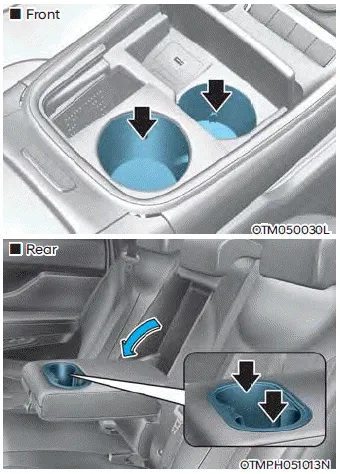
Cups or small beverages cups may be placed in the cup holders.
WARNING
- Avoid abrupt starting and braking when the cup holder is in use to prevent spilling your drink. If hot liquid spills, you could be burned. Such a burn to the driver could cause loss of vehicle control resulting in an accident.
- Do not place uncovered or unsecured cups, bottles, cans, etc., in the cup holder containing hot liquid while the vehicle is in motion. Injuries may result in the event of a sudden stop or collision.
- Only use soft cups in the cup holders. Hard objects can injure you in an accident.
- Do not forcefully open the cover. It may damage if you forcefully open the cover with your fingers, etc..
WARNING
Keep cans or bottles out of direct sun light and do not put them in a hot vehicle. It may explode.
NOTICE
- Keep your drinks sealed while driving to prevent spilling your drink. If liquid spills, it may get into the vehicle’s electrical/electronic system and damage electrical/electronic parts.
- When cleaning spilled liquids do not use hot air to blow out or dry the cup holder. This may damage the interior.
Ashtray

To use the ashtray, open the cover.
To clean the ashtray:
The plastic receptacle should be removed by lifting the plastic ashtray receptacle upward after turning the cover counterclockwise and pulling it out.
WARNING
Putting lit cigarettes or matches in an ashtray with other combustible materials may cause a fire.
Sunvisor
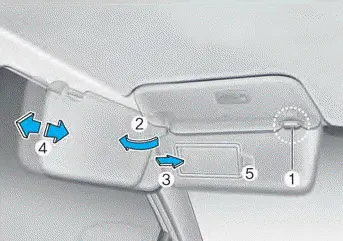
To use the sunvisor, pull it downward.
To use the sunvisor to block the sun from the side window, pull it downward, release it from the bracket (1) and swing it to the side (2) towards the window.
To use the vanity mirror, pull down the sunvisor and slide the mirror cover (3).
Adjust the sunvisor forward or backward (4) as needed (if equipped). Use the ticket holder (5) to hold tickets.
Close the vanity mirror cover securely and return the sunvisor to its original position after use.
WARNING
For your safety, do not block your view when using the sunvisor.
NOTICE
The tab (5) adjacent to the vanity mirror on the sunvisor can be used for toll road tickets or self parking tickets. Use caution when inserting tickets into the ticket holder to avoid damage. Refrain from putting several tickets in the ticket holder as this could also damage the retaining tab.
Power outlet
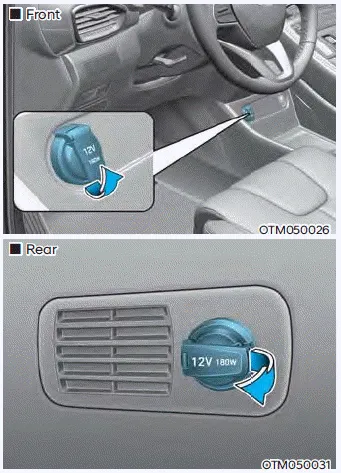
The power outlet is designed to provide power for mobile telephones or other devices designed to operate with vehicle electrical systems. The devices should draw less than 180 watts with the engine running.
WARNING
Avoid electrical shocks. Do not place your fingers or foreign objects (pin, etc.) into a power outlet or touch the power outlet with a wet hand.
CAUTION
To prevent damage to the power outlets:
- Use the power outlet only when the engine is running and remove the accessory plug after use. Using the accessory plug for prolonged periods of time with the engine off could cause the battery to discharge.
- Only use 12 volts electric accessories which are less than 180 watts in electric capacity.
- Adjust the air-conditioner or heater to the lowest operating level when using the power outlet.
- Close the cover when not in use.
- Some electronic devices can cause electronic interference when plugged into a vehicle’s power outlet. These devices may cause excessive audio static and malfunctions in other electronic systems or devices used in your vehicle.
- Push the plug in as far as it will go. If good contact is not made, the plug may overheat and the fuse may open.
- Plug in battery equipped electrical/ electronic devices with reverse current protection. The current from the battery may flow into the vehicle’s electrical/electronic system and cause system malfunction.
USB charger
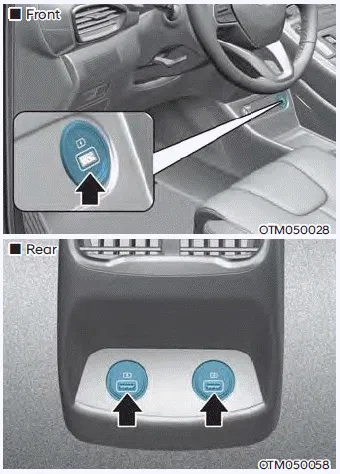
The USB charger is designed to recharge batteries of small size electrical devices using a USB cable.
The electrical devices can be recharged when the Engine Start/Stop button is in the ACC or ON (or START) position.
The battery charging state may be monitored on the electrical device.
Disconnect the USB cable from the USB port after use.
- A smart phone or a tablet PC may get warmer during the re-charging process. It does not indicate any malfunction with the charging system.
- A smart phone or a tablet PC, which adopts a different re-charging method, may not be properly recharged. In this case, use an exclusive charger of your device.
- The charging terminal is only to recharge a device. Do not use the charging terminal either to turn ON an audio or to play media In the infotainment system.
AC Inverter
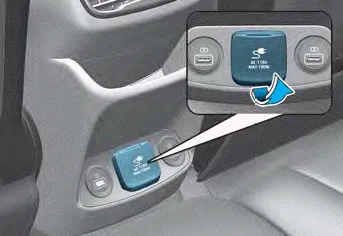
The AC inverter supplies 115V/150W electric power to operate electric accessories or equipments.
Information
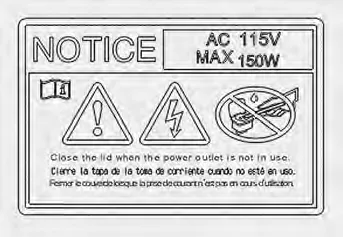
- Rated voltage : AC 115 volts
- Maximum electric power : 150 watts
- In order to avoid an electrical system failure, electric shock, etc., be sure to read owner’s manual before use.
- Be sure to close the cover except the time of use.
WARNING
To reduce a risk of serious or fatal injuries:
- Do not use a heated electric device such as a coffeepot, toaster, heater, iron, etc.
- Do not insert foreign objects into the outlet and do not touch the outlet as you may get shocked.
- Do not let children touch the AC inverter.
NOTICE
- To help prevent the battery from being discharged, do not use the AC inverter while the engine is not running.
- When not using the AC inverter, make sure to close the AC inverter cover.
- After using an electric accessory or equipment, pull the plug out. Leaving the accessory or equipment plugged in for a long time may cause battery discharge.
- Do not use an electric accessory or equipment the power consumption of which is greater than 220 volts/200 watts.
- Some electric accessories or equipment can cause electronic interference. It may cause excessive audio noise and malfunctions in other electric systems or devices in the vehicle.
- Do not use broken electric accessories or equipment, which may damage the AC inverter and electrical systems of the vehicle.
- Do not use two or more electric accessories or equipment at the same time. It may cause damage to the electrical systems of the vehicle.
- When the input voltage is lower, outlet LED will blink and the AC inverter will turn off automatically. If the input voltage goes up to normal, the AC inverter will turn on again.
Wireless smart phone charging system
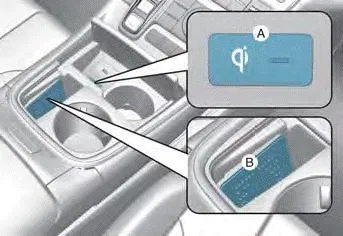
[A] : Indicator light, [B] : Charging pad
On certain models, the vehicle comes equipped with a wireless smart phone charger.
The system is available when all doors are closed, and when the Engine Start/ Stop button is in the ACC or ON (or START) position.
To charge a cellular phone
The wireless smart phone charging system charges only the Qi-enabled smart phones
(
 ). Read the label on the smart phone
accessory cover or visit your smart phone manufacturer’s website to check whether
your smart phone supports the Qi technology.
). Read the label on the smart phone
accessory cover or visit your smart phone manufacturer’s website to check whether
your smart phone supports the Qi technology.
The wireless charging process starts when you put a Qi-enabled smart phone on the wireless charging unit.
1. Remove other items, including the smart key, from the wireless charging unit. If not, the wireless charging process may be interrupted. Place the smart phone on the center of the charging pad.
2. The indicator light is orange when the smart phone is charging. The indicator light will turn blue when phone charging is complete.
3. You can turn ON or OFF the wireless charging function from the Settings menu on the instrument cluster. Select:
- Setup - User Settings - Convenience - Wireless Charging
If your smart phone is not charging:
- Slightly change the position of the smart phone on the charging pad.
- Make sure the indicator light is orange.
The indicator light will blink orange for 10 seconds if there is a malfunction in the wireless charging system.
In this case, temporarily stop the charging process, and re-attempt to charge your smart phone again.
The system warns you with a message on the LCD display if the smart phone is still on the wireless charging unit after the vehicle is turned OFF and the front door is opened.
For some manufacturer’s smart phones, the system may not warn you even though the smart phone is left on the wireless charging unit. This is due to the particular characteristic of the smart phone and not a malfunction of the wireless charging.
Information
For some manufacturers’ cellular phones, the system may not warn you even though the cellular phone is left on the wireless charging unit. This is due to the particular characteristic of the cellular phone and not a malfunction of the wireless charging.
NOTICE
- The wireless smart phone charging system may not support certain
smart phones, which are not verified for the Qi specification (
 ).
). - When placing your smart phone on the charging pad, position the phone in the middle of the mat for optimal charging performance. If your smart phone is off to the side, the charging rate may be less and in some cases the smart phone may experience higher heat conduction.
- In some cases, the wireless charging may stop temporarily when the smart key is used, either when starting the vehicle or locking/ unlocking the doors, etc.
- When charging certain smart phones, the charging indicator may not change to blue when the smart phone is fully charged.
- The wireless charging process may temporarily stop, when temperature abnormally increases inside the wireless smart phone charging system. The wireless charging process restarts, when temperature falls to a certain level.
- The wireless charging process may temporarily stop when there is any metallic item, such as a coin, between the wireless smart phone charging system and smart phone.
- When charging some smart phones with a self-protection feature, the wireless charging speed may decrease and the wireless charging may stop.
- If the smart phone has a thick cover, the wireless charging may not be possible.
- If the smart phone is not completely contacting the charging pad, wireless charging may not operate properly.
- Some magnetic items like credit cards, phone cards or rail tickets may be damaged if left with the smart phone during the charging process.
- When any smart phone without a wireless charging function or a metallic object is placed on the charging pad, a small noise may sound. This small sound is due to the vehicle discerning compatibility of the object placed on the charging pad. It does not affect your vehicle or the smart phone in any way.
Information
If the Ignition switch is in the OFF position, the charging also stops.
Information
This device complies with part 15 of the FCC Rules.
Operation is subject to the following two conditions:
1. This device may not cause harmful interference, and
2. This device must accept any interference received, including interference that may cause undesired operation.
Clock. Coat hook
Clock
The clock can be set from the infotainment system.
WARNING
Do not attempt to adjust the clock while driving. Doing so may result in distracted driving which may lead to an accident involving personal injury or death.
Coat hook
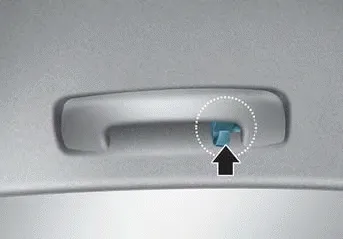
These hooks are not designed to hold large or heavy items.
WARNING
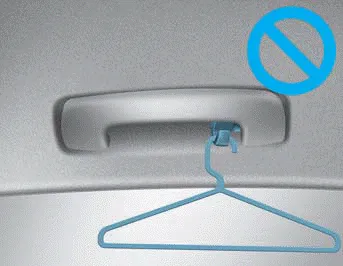
Do not hang other objects such as hangers or hard objects except clothes. Also, do not put heavy, sharp or breakable objects in the clothes pockets. In an accident or when the curtain air bag is inflated, it may cause vehicle damage or personal injury.
Floor mat anchor(s)
ALWAYS use the Floor Mat Anchors to attach the front floor mats to the vehicle. The anchors on the front floor carpet keep the floor mats from sliding forward.
WARNING
Do not overlay additional mats or liners over the floor mats. If using All Weather mats, remove the carpeted floor mats before installing them. Only use floor mats designed to connect to the anchors.
WARNING
The following must be observed when installing ANY floor mat to the vehicle.
- Ensure to remove a protective film attached on the carpet before attaching a floor mat on the front floor carpet. Otherwise, the floor mat may move freely on the protective film and it could result in unintentional braking or accelerating.
- Ensure that the floor mats are securely attached to the vehicle’s floor mat anchor(s) before driving the vehicle.
- Do not use ANY floor mat that cannot be firmly attached to the vehicle’s floor mat anchors.
- Do not stack floor mats on top of one another (for example, all-weather rubber mat on top of a carpeted floor mat). Only a single floor mat should be installed in each position.
IMPORTANT - Your vehicle was manufactured with driver’s side floor mat anchors that are designed to securely hold the floor mat in place. To avoid any interference with pedal operation, HYUNDAI recommends that the HYUNDAI floor mat designed for use in your vehicle be installed.
Side curtain
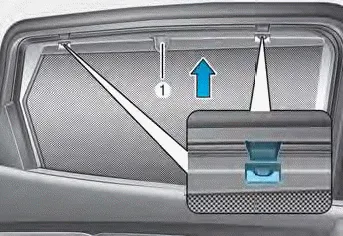
To use the side curtain:
1. Lift the curtain by the hook (1).
2. Hang the curtain on both sides of the hook.
CAUTION
- Always hang both sides of the curtain on the hook. This could cause damage to the side curtain if only one side of the curtain is hooked.
- Do not let any foreign material get in between the vehicle and side curtain. The side curtain may not be lifted up.
Luggage net holder
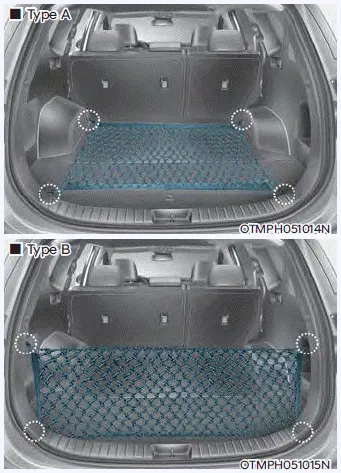
To keep items from shifting in the luggage compartment, you can use the 4 holders located in the luggage side trim to attach the luggage net.
Make sure the luggage net is securely attached to the holders in the luggage board.
If necessary, contact your authorized HYUNDAI dealer to obtain a luggage net.
WARNING
Avoid eye injury. DO NOT overstretch the luggage net. ALWAYS keep your face and body out of the luggage net’s recoil path. DO NOT use the luggage net when the strap has visible signs of wear or damage.
Use the luggage net to keep only light items from shifting in the luggage compartment.
Cargo security screen
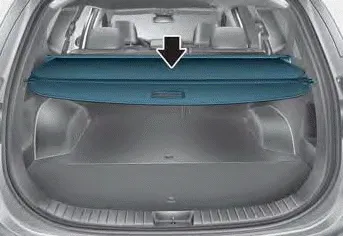
Use the cargo security screen to cover items stored in the cargo area.
Using the cargo security screen
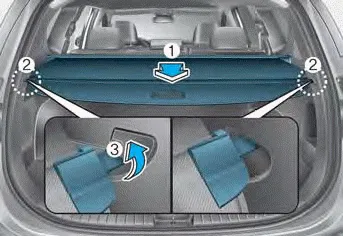
1. Pull the cargo security screen towards the rear of the vehicle by the handle (1).
2. Insert the guide pin (2) into the guide (3).
Information
Pull out the cargo security screen with the handle in the center to prevent the guide pin from falling out of the guide. When the cargo security screen is not in use:
1. Pull the cargo security screen backward and up to release it from the guides.
2. The cargo security screen will automatically slide back in.
Information
The cargo security screen may not automatically slide back in if the cargo security screen is not fully pulled out. Pull the cargo screen out all the way and then slowly allow the screen to retract back in.
NOTICE
Since the cargo security screen may be damaged or malformed, do not put luggage on it when it is used.
WARNING
- Do not place objects on the cargo security screen. Such objects may be thrown about inside the vehicle and possibly injure vehicle occupants during an accident or when braking.
- Never allow anyone to ride in the luggage compartment. It is designed for luggage only.
- Maintain the balance of the vehicle and locate the weight as forward as possible.
WARNING Never store cigarette lighters, propane cylinders, or other flammable/explosive materials in the vehicle. These items may catch fire and/or explode if the vehicle is exposed to hot temperatures for extended periods.
Roof side rails If your vehicle comes with roof side rails, then roof side rails crossbars can be installed on top of your vehicle. The roof side rails crossbars are an accessory and are available at your HYUNDAI dealer.
Other information:
Hyundai Santa Fe (TM) 2019-2023 Service and Repair Manual: Auto Head Lamp Leveling Device
Components and components location Component Location 1. Head lamp leveling actuator Head Lamp Leveling Switch. Schematic diagrams Circuit diagram Head Lamp Leveling Switch. Repair procedures Inspection 1.
Hyundai Santa Fe (TM) 2019-2023 Service and Repair Manual: Troubleshooting
Troubleshooting Problem Symptoms Table Before replacing or repairing air conditioning components, first determine if the malfunction is due to the refrigerant charge, air flow or compressor. Use the table below to help you find the cause of the problem.
Categories
- Manuals Home
- Hyundai Santa Fe Owners Manual
- Hyundai Santa Fe Service Manual
- Rear seats
- Horn
- LCD Display
- New on site
- Most important about car
