
Hyundai Santa Fe (TM): Brake System / Brake bleeding procedures
| Brake System Bleeding |
|

| 1. |
Make sure the brake fluid in the reservoir is at the MAX (upper) level
line.
|
| 2. |
Have someone slowly pump the brake pedal several times, and then apply
pressure.
|
| 3. |
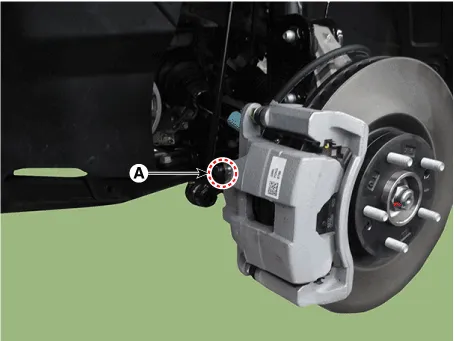
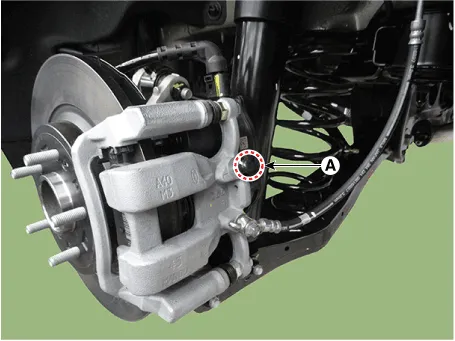
Loosen the right-rear brake bleed screw (A) to allow air to escape from
the system. Then tighten the bleed screw securely.
[Front]
[Rear]
|
| 4. |
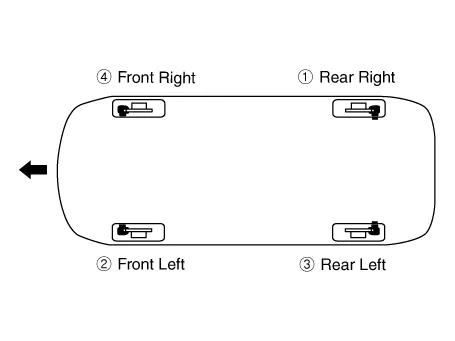
Repeat the procedure for wheel in the sequence shown below until air
bubbles no longer appear in the fluid.
|
| 5. |
Follow the sequence as shown below.
|
| 6. |
Refill the master cylinder reservoir to MAX (upper) level line.
|
|

| 1. |
Remove the reservoir cap and fill the brake reservoir with brake fluid.
|
| 2. |
Connect a clear plastic tube to the wheel cylinder bleeder plug and
insert the other end of the tube into a half filled clear plastic bottle.
|
| 3. |
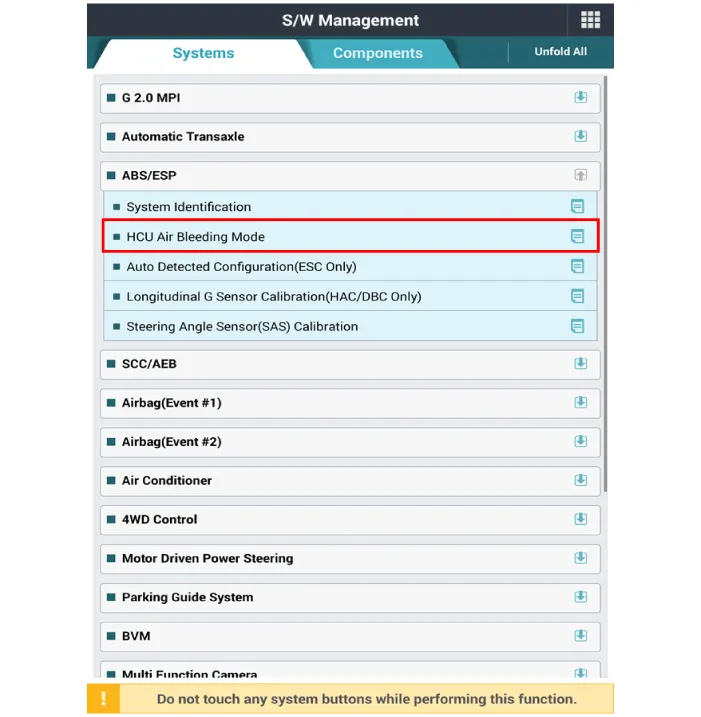
Connect the diagnostic tool to the data link connector located underneath
the dash panel.
|
| 4. |
Select and operate according to the instructions on the diagnostic tool
screen.
|
| 5. |
Have someone slowly pump the brake pedal several times, and then apply
pressure.
|
| 6. |
Pump the brake pedal several times, and then loosen the bleeder screw
until fluid starts to run out without bubbles. Then close the bleeder
screw (A).
[Front]
[Rear]
|
| 7. |
Repeat the procedure for wheel in the sequence shown below until air
bubbles no longer appear in the fluid.
|
| 8. |
Refill the master cylinder reservoir to MAX (upper) level line.
|
Troubleshooting Problem Symptoms Table Use the table below to help you find the cause of the problem. The numbers indicate the priority of the like cause of the problem.
Other information:
Hyundai Santa Fe (TM) 2019-2023 Service and Repair Manual: Keyless Entry And Burglar Alarm
Description and operation Description Burglar Alarm State [B/A State] B/A State Description DISARM 1) In "DISARM" state, no vehicle start inhibition.
Hyundai Santa Fe (TM) 2019-2023 Service and Repair Manual: Rear View Monitor (RVM)
Description and operation Description Back view camera will activate when the backup light is ON with the ignition switch ON and the shift lever in the R position. This system is a supplemental system that shows behind the vehicle through the H/UNIT or the ECM (Reverse Display Room Mirror) mirror while backing-up.
Categories
- Manuals Home
- Hyundai Santa Fe Owners Manual
- Hyundai Santa Fe Service Manual
- Lane Following Assist (LFA)
- Electronic Parking Brake (EPB)
- Power Tailgate Module
- New on site
- Most important about car
