
Hyundai Santa Fe (TM): Audio / Audio Unit. Repair procedures
| Removal |
| 1. |
Disconnect the negative (-) battery terminal.
|
| 2. |
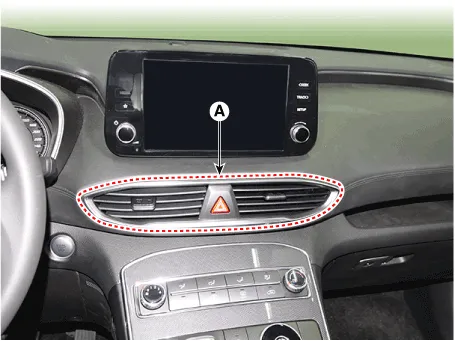
Remove the center air vent duct (A).
|
| 3. |
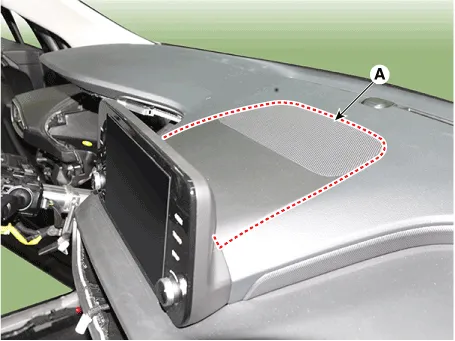
Remove the center speaker (A).
|
| 4. |
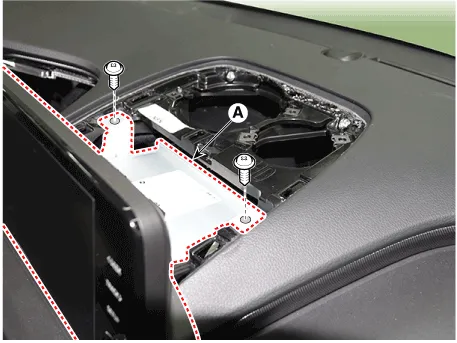
Seperate the audio head unit (A) from crash pad after loosening the
screws.
|

| 5. |
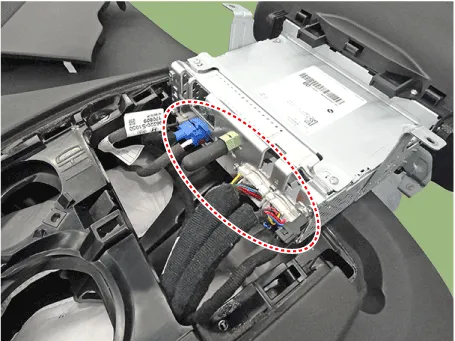
Remove the audio head unit after disconnecting the connectors and cable.
|
| Installation |
| 1. |
Connect the audio unit connectors and cable.
|
| 2. |
Install the audio head unit.
|
| 3. |
Install the center air vent duct.
|
| 4. |
Connect the negative (-) battery terminal.
|

Components Connector Pin Information No Connector A Connector B 1 Rear left speaker (+) - 2 Front left speaker (+) - 3 Front right speaker (+) - 4 Rear right speaker (+) Steering wheel remote 5 - - 6 Door open USB DATA (+) 7 IGN1 USB VOC 8 Illumination (+) - 9 Detent - 10 Rear left speaker (-) Mic (+) 11 Front left speaker (-) ACC 12 Front right speaker (-) B+ 13 Rear right speaker (-) - 14 - - 15 - - 16 - Vehicle Speed 17 Illumination (-) Steering wheel remote GND 18 - USB DATA (-) 19 USB GND 20 - 21 - 22 Mic (-) 23 - 24 GND
Inspection 1. Troubleshooting for Speaker (1) Basic inspection of speaker Inspect the sound from speaker after verifying that the speaker mounting screws is removed and the wiring connector is connected precisely to remove vibration transmitted from body trims and surrounding parts.
Other information:
Hyundai Santa Fe (TM) 2019-2023 Service and Repair Manual: Temperature Control Actuator. Repair procedures
Inspection 1. Turn the ignition switch OFF. 2. Disconnect the temperature control actuator connector. 3. Verify that the temperature control actuator operates to the cool position when connecting 12V to terminal 3 and grounding terminal 7.
Hyundai Santa Fe (TM) 2019-2023 Service and Repair Manual: Description and operation
Description Rear Corner Radar is a system that measures the relative speed and distance from the following vehicles by using two electromagnetic wave radar sensors attached to the rear bumper, and detects any vehicle within the blind spot zone and gives off alarm.