
Hyundai Santa Fe (TM): Accessing your vehicle / Smart key
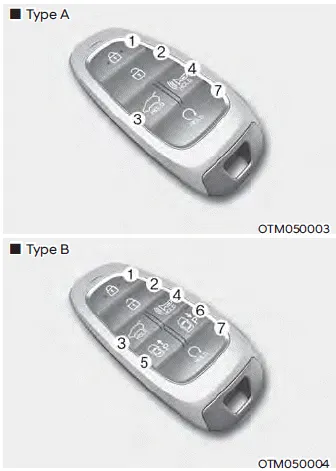
Your HYUNDAI uses a smart key, which you can use to lock or unlock a door (and liftgate) and even start the engine even just carrying the key.
1. Door lock
2. Door unlock
3. Liftgate Open (Liftgate)
Liftgate Open / Close (Power liftgate)
4. Panic Open / Close
5. Remote Smart parking Assist (Forward)
6. Remote Smart parking Assist (Rearward)
7. Remote start
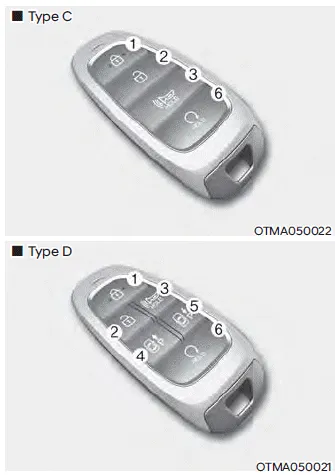
1. Door lock
2. Door unlock
3. Panic
4. Remote Smart Parking Assist (Forward)
5. Remote Smart Parking Assist (Rearward)
6. Remote start
Locking your vehicle (Button type)
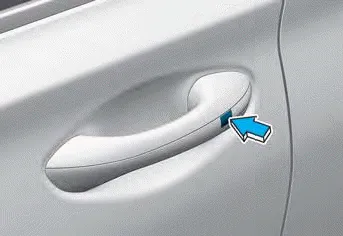
To lock :
1. Close all doors, engine hood and liftgate.
2. Carry the smart key.
3. Either press the door handle button or press the Door Lock button (1) on the smart key.
4. The hazard warning lights will blink. Also, the side view mirror will fold, if 'Convenience -> Welcome mirror/light -> On door unlock or On driver approach’ is selected from the User Settings mode on the LCD display. For more details, refer to “LCD Display� in chapter 4.
5. Make sure the doors are locked by checking the position of the door lock button inside the vehicle.
Locking your vehicle (Touch sensor type)
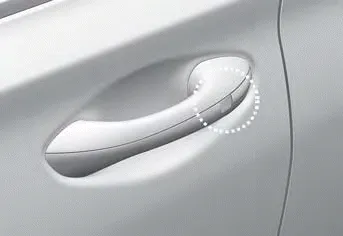
1. Close all of the doors, the hood and the liftgate.
2. Make sure you have the smart key in your possession and touch either the touch sensor on the door handle (the engraved part) or press the Door Lock button (1) on the smart key within 1 second.
3. The doors, hood and trunk are locked.
The chime will sound once and the hazard warning lights will blink.
- The door handle button will only operate when the smart key is within 28~40 inches (0.7~1 m) from the outside door handle.
- Make sure the doors are locked by pulling the door handle.
- If you locked the door with the touch sensor on the door handle, the doors cannot be unlocked with the sensor within 3 seconds.
Even though you press the outside door handle button, the doors will not lock and the chime will sound for three seconds if any of the following occur:
- The Smart Key is in the vehicle.
- The Engine Start/Stop button is in ACC or ON position.
- Any door except the liftgate is open.
CAUTION
When you leave your vehicle with the smart key, make sure to press the button on the front door handle or touch the touch sensor on the front door handle to lock the doors after close all of the doors, the hood and the trunk. If you do not press the button or touch the touch sensor firmly, the doors might not be locked so please use caution.
WARNING
Do not leave the Smart Key in your vehicle with unsupervised children. Unattended children could press the Engine Start/ Stop button and may operate power windows or other controls, or even make the vehicle move, which could result in serious injury or death.
Unlocking your vehicle
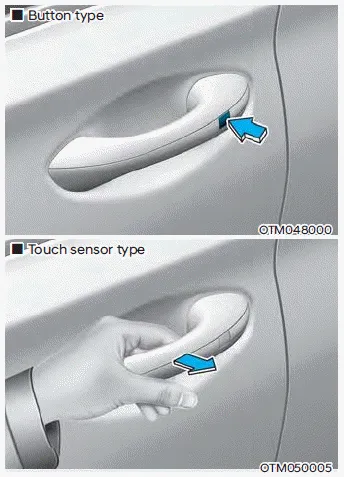
1. Make sure you have the smart key in your possession.
2. Press the Door Unlock button (2) on the smart key, press the button on the front door handle or touch the door unlock sensor inside of the front door handle to unlock the doors.
3. All of the doors will unlock. When the doors unlock, the hazard warning lights will blink two times and the chime will sound.
-
Opening the liftgate. Remotely starting vehicle
Opening the liftgate
To open the liftgate:
1. Make sure you have the smart key in your possession.
2. Press either the liftgate open/close button on the vehicle or press and hold the liftgate open button on the smart key for more than one second. The hazard warning lights will blink two times and the liftgate will open.
Remotely starting vehicle (if equipped)
You can start the vehicle using the Remote Start button on the smart key. To start the vehicle remotely:
1. Press the door lock button on the smart key within 32 feet (10 m) from the vehicle.
2. Press the Remote Start button for more than 2 seconds within 4 seconds after pressing the door lock button.
3. The hazard warning lights will blink and the engine will start.
4. To turn off the remote start function, press the Remote Start button once.
Information
- The vehicle must be in P (Park) for the remote start function to start.
- The engine turns off if you get on the vehicle without a registered smart key.
- The engine turns off if you do not get on the vehicle within 10 minutes after remotely starting the vehicle.
- The Remote Start button may not operate if the smart key is not within 32 feet (10 m).
- The vehicle will not remotely start if the engine hood or liftgate is opened.
- Do not idle the engine for a long period.
Remotely moving vehicle forward or reverse. Panic alarm. Start-up
Remotely moving vehicle forward or reverse
With the smart key, the driver can move the vehicle forward or reverse using the Forward or Reverse button on the smart key.
Panic alarm
The horn sounds and the hazard warning lights blink for about 30 seconds if this button is pressed for more than 0.5 seconds. To stop the horn and lights, press any button on the transmitter.
Start-up
You can start the vehicle without inserting the key.
Information
If the smart key is not moved for some time, the detection function for smart key operation will pause. Lift the smart key to activate the detection again.
NOTICE
To prevent damaging the smart key:
- Keep the smart key in a cool, dry place to avoid damage or malfunction. Exposure to moisture or high temperature may cause the internal circuit of the smart key to malfunction which may not be covered under warranty.
- Avoid dropping or throwing the smart key.
- Protect the smart key from extreme temperatures.
Mechanical key
If the Smart Key does not operate normally, you can lock or unlock the driver’s door by using the mechanical key.
To remove the mechanical key from the smart key FOB:
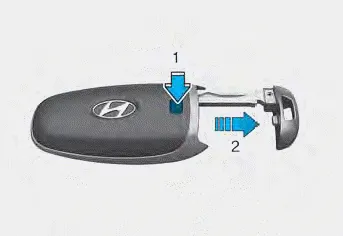
Press and hold the release button (1) and remove the mechanical key (2). Insert the mechanical key into the key hole on the door.
To reinstall the mechanical key, put the key into the hole and push it until a click sound is heard.
Loss of a smart key. Smart key precautions
Loss of a smart key
A maximum of two smart keys can be registered to a single vehicle. If you happen to lose your smart key, it is recommended that you should immediately take the vehicle and remaining key to your authorized HYUNDAI dealer or tow the vehicle, if necessary.
Smart key precautions
The smart key may not work if any of the following occur:
- The smart key is close to a radio transmitter such as a radio station or an airport which can interfere with normal operation of the transmitter.
- The smart key is near a mobile two way radio system or a mobile phone.
- Another vehicle’s smart key is being operated close to your vehicle.
If the smart key does not work correctly, open and close the door with the mechanical key. If you have a problem with the smart key, it is recommended to contact an authorized HYUNDAI dealer.
If the smart key is in close proximity to your mobile phone, the signal could be blocked by your mobile phone’s normal operational signals. This is specifically relevant when the phone is active such as making and receiving calls, text messaging, and/or sending/receiving emails. When possible, avoid keeping the smart key and your mobile phone in the same location such as a pants or jacket pocket in order to avoid interference between the two devices.
Information
This device complies with Part 15 of the FCC rules.
Operation is subject to the following three conditions:
1. This device may not cause harmful interference.
2. This device must accept any interference received, including interference that may cause undesired operation.
3. Changes or modifications not expressly approved by the party responsible for compliance could void the user’s authority to operate the device.
NOTICE
- Keep the smart key away from electromagnetic materials that blocks electromagnetic waves to the key surface.
- Always have the smart key with you when leaving the vehicle. If the smart key is left near the vehicle, the vehicle battery may be discharged.
Battery replacement
If the Smart Key is not working properly, try replacing the battery with a new one.
Battery Type: CR2032
To replace the battery:
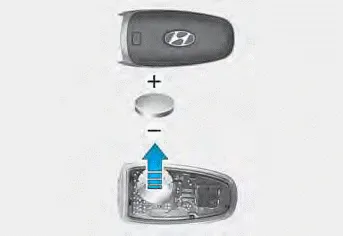
If the Smart Key is not working properly, try replacing the battery with a new one.
Remove the smart key cover by turning the screwdriver clockwise by inserting the screwdriver (-) into the hole.
Battery Type: CR2032
To replace the battery:
1. Remove the mechanical key.
2. Use a slim tool to pry open the rear cover of the smart key.
3. Remove the old battery and insert the new battery. Make sure the battery position is correct.
4. Reinstall the rear cover of the smart key.
If you suspect your smart key might have sustained some damage, or you feel your smart key is not working correctly, it is recommended that you contact an authorized HYUNDAI dealer.
WARNING
THIS PRODUCT CONTAINS A BUTTON BATTERY.
If swallowed, a lithium button battery can cause severe or fatal injuries within 2 hours. Keep batteries out of reach of children.
If you think batteries may have been swallowed or placed inside any part of the body, seek immediate medical attention.
Information
An inappropriately disposed battery can be harmful to the environment and human health. Dispose of the battery according to your local law(s) or regulations.
Your HYUNDAI uses a remote key, which you can use to lock or unlock the driver and passenger doors or the liftgate. 1. Door Lock 2. Door Unlock 3. Liftgate Open 4.
The immobilizer system helps protect your vehicle from theft. If an improperly coded key (or other device) is used, the engine’s fuel system is disabled.
Other information:
Hyundai Santa Fe (TM) 2019-2023 Service and Repair Manual: Compressor oil. Repair procedures
Oil Specification 1. The R-134a or R-1234yf system requires synthetic (PAG) compressor oil whereas the R-12 system requires mineral compressor oil. The two oils must never be mixed. 2.
Hyundai Santa Fe (TM) 2019-2023 Service and Repair Manual: Description and operation
Categories
- Manuals Home
- Hyundai Santa Fe Owners Manual
- Hyundai Santa Fe Service Manual
- Identification Numbers
- Electronic Parking Brake (EPB)
- Instrument cluster
- New on site
- Most important about car
