
Hyundai Santa Fe (TM): Smart key / Battery replacement
If the Smart Key is not working properly, try replacing the battery with a new one.
Battery Type: CR2032
To replace the battery:
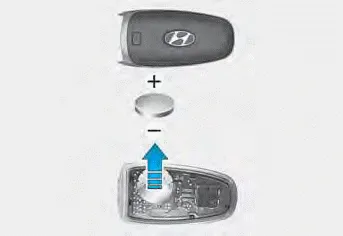
If the Smart Key is not working properly, try replacing the battery with a new one.
Remove the smart key cover by turning the screwdriver clockwise by inserting the screwdriver (-) into the hole.
Battery Type: CR2032
To replace the battery:
1. Remove the mechanical key.
2. Use a slim tool to pry open the rear cover of the smart key.
3. Remove the old battery and insert the new battery. Make sure the battery position is correct.
4. Reinstall the rear cover of the smart key.
If you suspect your smart key might have sustained some damage, or you feel your smart key is not working correctly, it is recommended that you contact an authorized HYUNDAI dealer.
WARNING
THIS PRODUCT CONTAINS A BUTTON BATTERY.
If swallowed, a lithium button battery can cause severe or fatal injuries within 2 hours. Keep batteries out of reach of children.
If you think batteries may have been swallowed or placed inside any part of the body, seek immediate medical attention.
Information
An inappropriately disposed battery can be harmful to the environment and human health. Dispose of the battery according to your local law(s) or regulations.
Loss of a smart key A maximum of two smart keys can be registered to a single vehicle. If you happen to lose your smart key, it is recommended that you should immediately take the vehicle and remaining key to your authorized HYUNDAI dealer or tow the vehicle, if necessary.
The immobilizer system helps protect your vehicle from theft. If an improperly coded key (or other device) is used, the engine’s fuel system is disabled.
Other information:
Hyundai Santa Fe (TM) 2019-2023 Service and Repair Manual: Components and components location
Hyundai Santa Fe (TM) 2019-2023 Service and Repair Manual: Remote Smart Parking Assist (RSPA). Repair procedures
Removal ADAS Parking ECU (ADAS_PRK) 1. Disconnect the negative (-) battery terminal. 2. Remove the ADAS Parking ECU (ADAS_PRK). (Refer to Advanced Driver Assistance System (ADAS) - "ADAS Parking ECU (ADAS_PRK)") Parking/View switch
Categories
- Manuals Home
- Hyundai Santa Fe Owners Manual
- Hyundai Santa Fe Service Manual
- Instrument cluster
- Front Radar Unit. Repair procedures
- Engine Mechanical System
- New on site
- Most important about car
