
Hyundai Santa Fe: Infotainment system / USB Port
.png)
You can use an USB cable to connect audio devices to the vehicle USB port.
Information
When using a portable audio device connected to the power outlet, noise may occur during playback. If this happens, use the portable audio device’s power source.
 Infotainment system
NOTICE
If you install an aftermarket HID head lamp, your vehicle’s audio
and electronic devices may not function properly.
Prevent chemicals such as perfume, cosmetic oil, sun cream, hand
cleaner, and air freshener from contacting the interior parts because they may
cause damage or discoloration...
 Antenna
Shark fin antenna
The shark fin antenna receives transmitted data. (for example: AM/FM, DAB, GPS)
Steering wheel remote controls
NOTICE
Do not operate multiple audio remote control buttons simultaneously...
Other information:
Hyundai Santa Fe (TM) 2019-2025 Owner's Manual: Windshield defrosting and defogging
WARNING Windshield heating Do not use the position during cooling operation in extremely humid weather. The difference between the temperature of the outside air and that of the windshield could cause the outer surface of the windshield to fog up, causing loss of visibility could cause an accident resulting in serious injury or death...
Hyundai Santa Fe (TM) 2019-2025 Service Manual: Front Door Frame Garnish. Repair procedures
Replacement • Put on gloves to prevent hand injuries. • When removing with a flat-tip screwdriver or remover, wrap protective tape around the tools to prevent damage to components...
Categories
- Manuals Home
- 4th Generation Santa Fe Owners Manual
- 4th Generation Santa Fe Service Manual
- Body (Interior and Exterior)
- Electronic Parking Brake (EPB) warning light. AUTO HOLD indicator light
- Side air bags
- New on site
- Most important about car
Interior Overview
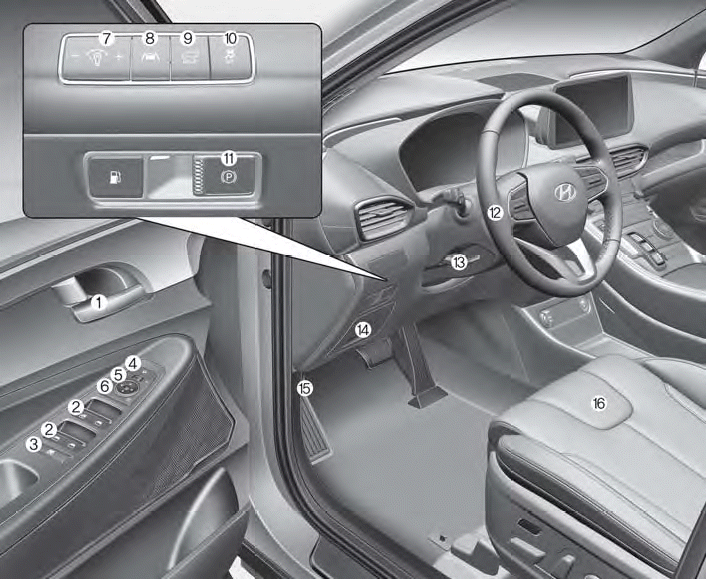
1. Inside door handle
2. Power window switches
3. Power window lock button/Electronic child safety lock button
4. Side view mirror folding button
5. Side view mirror control switch
6. Central door lock switch
7. Instrument panel illumination control switch

Copyright © 2025 www.hsafe4.com