
Hyundai Santa Fe (TM): Convenience features / Infotainment system
NOTICE
- If you install an aftermarket HID head lamp, your vehicle’s audio and electronic devices may not function properly.
- Prevent chemicals such as perfume, cosmetic oil, sun cream, hand cleaner, and air freshener from contacting the interior parts because they may cause damage or discoloration.
USB Port
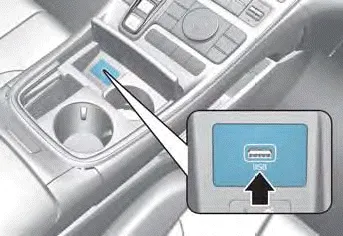
You can use an USB cable to connect audio devices to the vehicle USB port.
Information
When using a portable audio device connected to the power outlet, noise may occur during playback. If this happens, use the portable audio device’s power source.
Antenna
Shark fin antenna
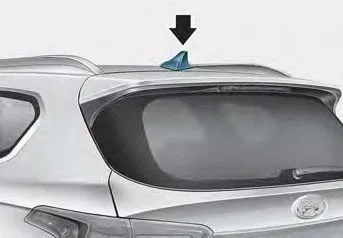
The shark fin antenna receives transmitted data. (for example: AM/FM, DAB, GPS)
Steering wheel remote controls
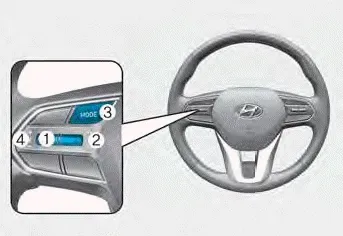
NOTICE
Do not operate multiple audio remote control buttons simultaneously.
VOLUME (VOL + / VOL -) (1)
- Rotate the VOLUME scroll up to increase volume.
- Rotate the VOLUME scroll down to decrease volume.
SEEK/PRESET (Ë„/Ë…) (2)
If the SEEK/PRESET switch is pressed up or down and held for 0.8 second or more, it will function in the following modes:
- RADIO mode
It will function as the AUTO SEEK select button. It will SEEK until you release the button.
- MEDIA mode
It will function as the FF/RW button.
If the SEEK/PRESET switch is pressed up or down, it will function in the following modes:
- RADIO mode
It will function as the PRESET STATION UP/DOWN button.
- MEDIA mode
It will function as the TRACK UP/ DOWN button.
MODE (3)
Press the MODE button to toggle through Radio or Media modes.
MUTE (
 ) (4)
) (4)
- Press the MUTE button to mute the sound.
- Press the MUTE button again to activate the sound.
Information
See additional information in supplied Infotainment Manual.
Infotainment system. Voice recognition
Infotainment system
For detailed information, refer to the separately supplied infotainment system manual.
Voice recognition
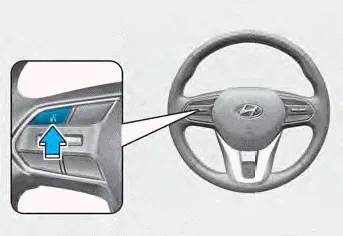
For detailed information, refer to the separately supplied infotainment system manual.
Bluetooth® Wireless Technology
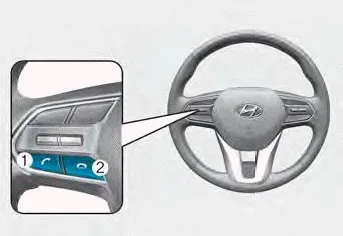
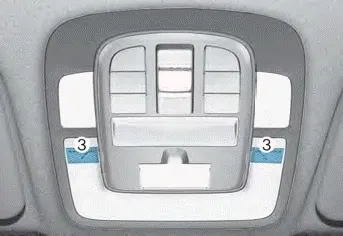
(1) Call / Answer button
(2) Call end button
(3) Microphone
For detailed information, refer to the separately supplied infotainment system manual.
CAUTION
To avoid driver distractions, do not excessively operate the device while driving the vehicle which may lead to an accident.
How vehicle radio works
FM reception
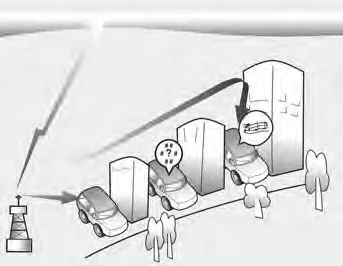
AM and FM radio signals are broadcast from transmitter towers located around your city. They are intercepted by the radio antenna on your vehicle. This signal is then received by the radio and sent to your vehicle speakers.
When a strong radio signal has reached your vehicle, the precise engineering of your audio system ensures the best possible quality reproduction. However, in some cases the signal coming to your vehicle may not be strong and clear.
This can be due to factors, such as the distance from the radio station, closeness of other strong radio stations or the presence of buildings, bridges or other large obstructions in the area.
AM (MW, LW) reception
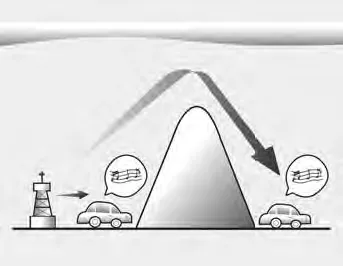
AM broadcasts can be received at greater distances than FM broadcasts. This is because AM radio waves are transmitted at low frequencies. These long, low frequency radio waves can follow the curvature of the earth rather than travelling straight out into the atmosphere.
In addition, they curve around obstructions so that they can provide better signal coverage.
FM radio station
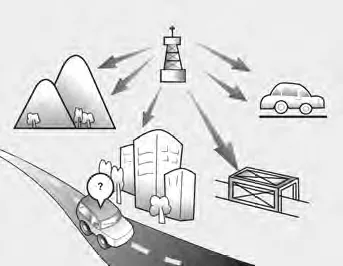
FM broadcasts are transmitted at high frequencies and do not bend to follow the earth’s surface. Because of this, FM broadcasts generally begin to fade at short distances from the station. Also, FM signals are easily affected by buildings, mountains, or other obstructions. These can result in certain listening conditions which might lead you to believe a problem exists with your radio.
The following conditions are normal and do not indicate radio trouble :
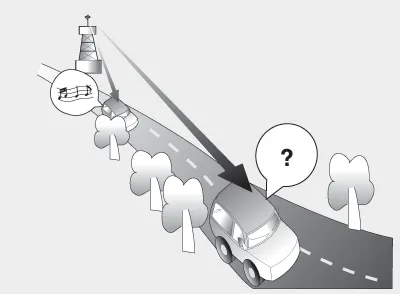
- Fading - As your vehicle moves away from the radio station, the signal will weaken and sound will begin to fade. When this occurs, we suggest that you select another stronger station.
- Flutter/Static - Weak FM signals or large obstructions between the transmitter and your radio can disturb the signal causing static or fluttering noises to occur. Reducing the treble level may lessen this effect until the disturbance clears.
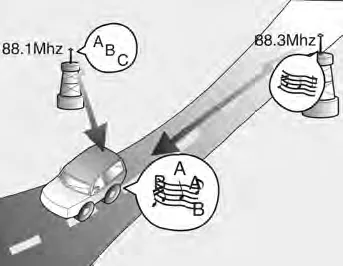
- Station Swapping - As a FM signal weakens, another more powerful signal near the same frequency may begin to play. This is because your radio is designed to lock onto the clearest signal. If this occurs, select another station with a stronger signal.
- Multi-Path Cancellation - Radio signals being received from several directions can cause distortion or fluttering. This can be caused by a direct and reflected signal from the same station, or by signals from two stations with close frequencies. If this occurs, select another station until the condition has passed.
Using a cellular phone or a twoway radio
When a cellular phone is used inside the vehicle, noise may be produced from the audio system. This does not mean that something is wrong with the audio equipment. In such a case, use the cellular phone at a place as far as possible from the audio equipment.
NOTICE
When using a communication system such as a cellular phone or a radio set inside the vehicle, a separate external antenna must be fitted. When a cellular phone or a radio set is used with an internal antenna alone, it may interfere with the vehicle’s electrical system and adversely affect safe operation of the vehicle.
WARNING
Do not use a cellular phone while driving. Stop at a safe location to use a cellular phone.
Roof side rails If your vehicle comes with roof side rails, then roof side rails crossbars can be installed on top of your vehicle. The roof side rails crossbars are an accessory and are available at your HYUNDAI dealer.
USB Supported audio formats Audio file specification - WAVeform audio format - MPEG1/2/2.5 Audio Layer3 - Windows Media Audio Ver 7.X/8.X Bit rates - MPEG1 (Layer3): 32/40/48/56/64/80/96/112/128/160 /192/224/256/320 kbps - MPEG2 (Layer3): 8/16/24/32/40/48/56/64/80/96/112 /128/144/160 kbps - MPEG2.
Other information:
Hyundai Santa Fe (TM) 2019-2023 Service and Repair Manual: Auto Lighting Control System
Description and operation Description It's a system that uses illumination sensor to automatically turn ON the tail lamp and head lamp based on the change in surrounding environment's illumination condition. It activates when the vehicle enters/exits tunnel, or when the illumination condition in surrounding environ
Hyundai Santa Fe (TM) 2019-2023 Service and Repair Manual: AC Inverter System
Description and operation Description An inverter is a device that transforms the DC voltage from the battery into an AC voltage (220 V). The inverter can power various electrical devices that consume 200 W or less, including mobile phone or notebook rechargers, audio systems, and TVs.
Categories
- Manuals Home
- Hyundai Santa Fe Owners Manual
- Hyundai Santa Fe Service Manual
- 4 Wheel Drive (4WD) System
- Fuel Delivery System
- Troubleshooting
- New on site
- Most important about car
