
Hyundai Santa Fe (TM): Parking Safety / System settings
Settings functions for the system
Warning Volume
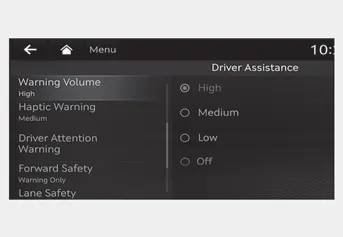
With the engine on, select ‘Driver Assistance → Warning Volume’ from the Settings menu to change the Warning Volume to ‘High’, ‘Medium’ or ‘Low’ for Remote Smart Parking Assist.
If you change the Warning Volume, the Warning Volume of other Driver Assistance systems may change.
Remote Smart Parking Assist uses vehicle sensors to help the driver park and exit parking spaces remotely from outside the vehicle by controlling the steering wheel, vehicle speed and gearshifts.
Remote Smart Parking Assist button Remote Forward/Backward Operating order Remote Forward/Backward operates in the following order: 1. Getting ready to remotely move forward and in reverse 2.
Other information:
Hyundai Santa Fe (TM) 2019-2023 Service and Repair Manual: Troubleshooting
Troubleshooting Problem Symptoms Table Before replacing or repairing air conditioning components, first determine if the malfunction is due to the refrigerant charge, air flow or compressor. Use the table below to help you find the cause of the problem.
Hyundai Santa Fe (TM) 2019-2023 Service and Repair Manual: Photo Sensor. Repair procedures
Inspection 1. Emit intensive light toward the photo sensor using a lamp, and check the output voltage change. 2. The voltage will rise with higher intensive light and reduce with lower intensive light.
Categories
- Manuals Home
- Hyundai Santa Fe Owners Manual
- Hyundai Santa Fe Service Manual
- Electronic Parking Brake (EPB)
- Parking Brake System. Electronic Parking Brake (EPB)
- Auto Hold. Warning messages
- New on site
- Most important about car
