
Hyundai Santa Fe (TM): Parking Safety / System settings
Settings functions for the system
Warning Volume
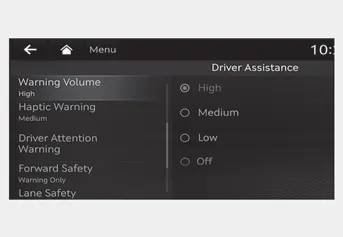
With the engine on, select ‘Driver Assistance → Warning Volume’ from the Settings menu to change the Warning Volume to ‘High’, ‘Medium’ or ‘Low’ for Remote Smart Parking Assist.
If you change the Warning Volume, the Warning Volume of other Driver Assistance systems may change.
Remote Smart Parking Assist uses vehicle sensors to help the driver park and exit parking spaces remotely from outside the vehicle by controlling the steering wheel, vehicle speed and gearshifts.
Remote Smart Parking Assist button Remote Forward/Backward Operating order Remote Forward/Backward operates in the following order: 1. Getting ready to remotely move forward and in reverse 2.
Other information:
Hyundai Santa Fe (TM) 2019-2023 Service and Repair Manual: Seat Electrical
Components and components location Component Location 1. Lumber support motor (Vertical) 2. Lumbar support motor (Horizontal) 3. Reclining motor 4. Rear height motor 5. Front height motor 6. Slide motor 7.
Hyundai Santa Fe (TM) 2019-2023 Service and Repair Manual: Button Engine Start System
Description and operation Description System Overview The System offers the following features: – Changing the state of engine ignition and power by using the start button. – Controlling external relays for ACC / IGN1 / IGN2 terminal switching and STARTER, without use
Categories
- Manuals Home
- Hyundai Santa Fe Owners Manual
- Hyundai Santa Fe Service Manual
- Battery. Specifications
- Engine Control/Fuel System
- Troubleshooting
- New on site
- Most important about car
