
Hyundai Santa Fe (TM): Smart Key System / Smart Key Unit. Repair procedures
| Removal |
| 1. |
Disconnect the negative (-) battery terminal.
|
| 2. |
Remove the glove box.
(Refer ti Body - "Glove Box")
|
| 3. |
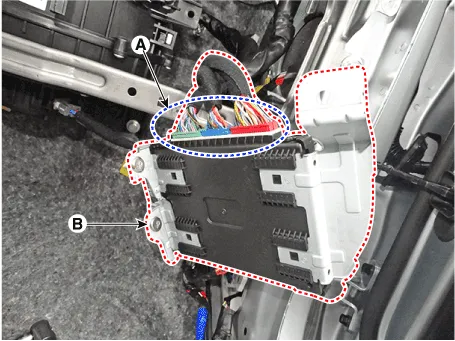
Remove the smart key unit (B) after loosening the mounting bolts(2EA)
and disconnecting the connector (A).
|
| Inspection |
| Installation |
| 1. |
Install the smart key unit.
|
| 2. |
Install the smart key unit mounting bolts and connect the connector.
|
| 3. |
Install the driver side crash pad lower panel.
|
| 4. |
Install the negative (-) battery terminal and check the smart key system.
|
Circuit Diagram
Inspection Self Diagnosis With Scan Tool It will be able to diagnose defects of SMART KEY system with diagnostic tool quickly. diagnostic tool can operates actuator forcefully, input/output value monitoring and self diagnosis.
Other information:
Hyundai Santa Fe (TM) 2019-2023 Service and Repair Manual: Power Door Locks
Components and components location Component Location 1. Driver power window main switch 2. IBU (Integrated Body Control Unit) 3. Door lock switch 4. Tailgate lock actuator & switch 5. Front door lock actuator & switch 6.
Hyundai Santa Fe (TM) 2019-2023 Service and Repair Manual: Surround View Monitor (SVM)
Description and operation Description Surround View Monitor (SVM) is the system that allows video monitoring of 360 degrees around the vehicle. The system includes 4 ultra optical camera mounted around the vehicle (front, both sides, rear).
Categories
- Manuals Home
- Hyundai Santa Fe Owners Manual
- Hyundai Santa Fe Service Manual
- Auto Hold. Warning messages
- Identification Numbers
- Instrument cluster
- New on site
- Most important about car
