
Hyundai Santa Fe (TM): Driving Safety / Lane Keeping Assist (LKA)
Lane Keeping Assist is designed to help detect lane markings (or road edges) while driving over a certain speed. The system will warn the driver if the vehicle leaves the lane without using the turn signal, or will automatically assist the driver’s steering to help prevent the vehicle from departing the lane.
Detecting sensor

[1] : Front view camera
The front view camera is used as a detecting sensor to detect lane markings (or road edges).
Refer to the picture above for the detailed location of the detecting sensor.
CAUTION
For more details on the precautions of the front view camera, refer to “Forward Collision-Avoidance Assist (FCA)� section in chapter 7.
System settings
Setting functions for the system
Lane Safety
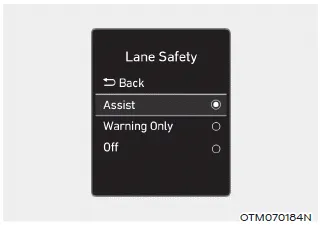
With the engine on, select ‘Driver Assistance → Lane Safety’ from the Settings menu to set whether or not to use each function.
-- If ‘Assist’ is selected, the system will automatically assist the driver’s
steering when lane departure is detected to help prevent the vehicle from moving
out of its lane.
-- If 'Warning Only' is selected, the system will warn the driver with an audible
warning when lane departure is detected. The driver must steer the vehicle.
-- If ‘Off’ is selected, the system will turn off. The
 indicator light will turn off on the
cluster.
indicator light will turn off on the
cluster.
WARNING
- If 'Warning Only' is selected, steering is not assisted.
- Lane Keeping Assist does not control the steering wheel when the vehicle is driven in the middle of the lane.
- The driver should always be aware of the surroundings and steer the vehicle if ‘Off’ is selected.
Turning the system On/Off (Lane Safety button)
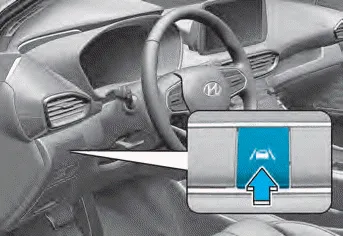
With the engine on, press and hold the Lane Safety button located on the instrument panel to turn on Lane Keeping Assist. The white indicator light will illuminate on the cluster.
Press and hold the button again to turn off the system.
If the engine is restarted, Lane Keeping Assist will maintain the last setting.
Information
When Lane Keeping Assist is turned off with the Lane Safety button, Lane Safety settings will turn off.
Turning the system On/Off (Lane Driving Assist button)
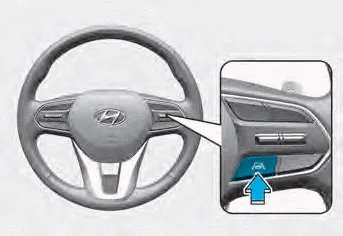
With the engine on, press and hold the Lane Driving Assist button located on
the steering wheel to turn on Lane Keeping Assist. The white
 indicator light will illuminate on the
cluster.
indicator light will illuminate on the
cluster.
Press and hold the button again to turn off the system.
If the engine is restarted, Lane Keeping Assist will maintain the last setting.
CAUTION
When the Lane Driving Assist button is pressed shortly, Lane Following Assist will turn on and off.
Warning Volume
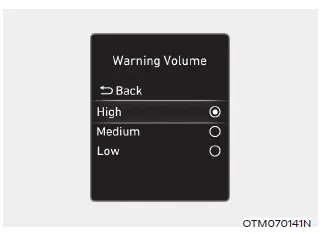
With the engine on, select ‘Driver Assistance → Warning Volume’ from the Settings menu to change the Warning Volume to ‘High’, ‘Medium’ or ‘Low’ for Lane Keeping Assist.
If you change the Warning Volume, the Warning Volume of other Driver Assistance systems may be changed.
System operation
System warning and control
Lane Keeping Assist will help warn and control the vehicle with Lane Departure Warning and Lane Keeping Assist.
Lane Departure Warning
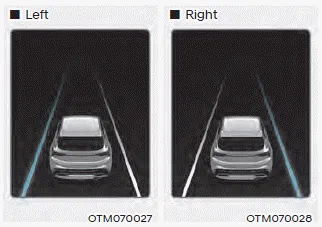
- To warn the driver that the vehicle is departing from the projected lane
in front, the green
 indicator light
will blink on the cluster, the lane line will blink on the cluster depending
on which direction the vehicle is veering, and an audible warning will sound.
indicator light
will blink on the cluster, the lane line will blink on the cluster depending
on which direction the vehicle is veering, and an audible warning will sound. - The system will operate when your vehicle speed is between approximately 40~120 mph (60~200 km/h).
Lane Keeping Assist
- To warn the driver that the vehicle is departing from the projected lane
in front, the green
 indicator light
will blink on the cluster, and the steering wheel will make adjustments to keep
the vehicle inside the lane.
indicator light
will blink on the cluster, and the steering wheel will make adjustments to keep
the vehicle inside the lane. - The system will operate when your vehicle speed is between approximately 40~120 mph (60~200 km/h).
Hands-off warning
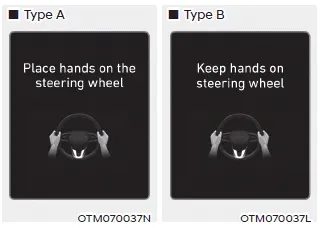
If the driver takes their hands off the steering wheel for several seconds, the ‘Place hands on the steering wheel’ (or ‘Keep hands on the steering wheel’) warning message will appear on the cluster, and an audible warning will sound in stages.
WARNING
- The steering wheel may not be assisted if the steering wheel is held very tight or the steering wheel is steered over a certain degree.
- Lane Keeping Assist does not operate at all times. It is the responsibility of the driver to safely steer the vehicle and to maintain the vehicle in its lane.
- The hands–off warning message may appear late depending on road conditions. Always have your hands on the steering wheel while driving.
- If the steering wheel is held very lightly, the hands–off warning message may appear because the system may not recognize that the driver has their hands on the steering wheel.
- If you attach objects to the steering wheel, the hands-off warning may not work properly.
Information
- You may change settings from the instrument cluster (User Settings) or infotainment system (Vehicle Settings), whichever option that is provided with your vehicle. For more details, see "User Settings" section in chapter 4, or "Vehicle Settings" section in supplied Infotainment Manual.
- When lane markings (or road edges) are detected, the lane lines on
the cluster will change from grey to white and the green
 indicator light will illuminate.
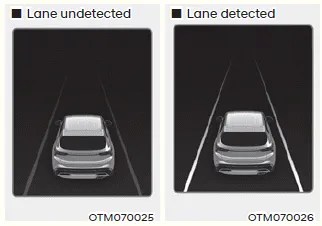
- Even though the steering is assisted by Lane Keeping Assist, the driver may control the steering wheel.
- The steering wheel may feel heavier or lighter when the steering wheel is assisted by Lane Keeping Assist than when it is not.
System malfunction and limitations
System malfunction
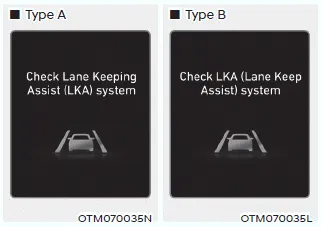
When Lane Keeping Assist is not working properly, the ‘Check Lane Keeping Assist
(LKA) system’ (or ‘Check LKA (Lane Keeping Assist) system’) warning message will
appear and the yellow
 indicator light
will illuminate on the cluster. If this occurs, we recommend that the system be
inspected by an authorized HYUNDAI dealer.
indicator light
will illuminate on the cluster. If this occurs, we recommend that the system be
inspected by an authorized HYUNDAI dealer.
Limitations of the system
Lane Keeping Assist may not operate normally or may operate unexpectedly under the following circumstances:
- The lane is contaminated or difficult to distinguish because,
-- The lane markings (or road edge) is covered with rain, snow, dirt, oil, etc.
-- The color of the lane marking (or road edge) is not distinguishable from the road
-- There are markings (or road edges) on the road near the lane or the markings (or road edges) on the road looks similar to the lane markings (or road edge)
-- The lane marking (or road edge) is indistinct or damaged
-- The shadow is on the lane marking (or road edge) by a median strip, trees, guardrail, noise barriers, etc. - There are more than two lane markings (or road edges) on the road
- The lane number increases or decreases, or the lane markings (or road edges) are crossing
- The lane markings (or road edges) are complicated or a structure substitutes for the lines, such as a construction area
- There are road markings, such as zigzag lanes, crosswalk markings and road signs
- The lane suddenly disappears, such as at the intersection
- The lane (or road width) is very wide or narrow
- There is a road edge without a lane
- There is a boundary structure in the roadway, such as a tollgate, sidewalk, curb, etc.
- The distance to the front vehicle is extremely short or the vehicle in front is covering the lane marking (or road edge)
WARNING
Take the following precautions when using Lane Keeping Assist:
- The driver should hold the responsibility to safely drive and control the vehicle. Do not solely rely on the system and drive dangerously.
- The operation of Lane Keeping Assist can be cancelled or not work properly depending on road conditions and surroundings. Always be cautious while driving.
- Refer to “Limitations of the System� if the lane is not detected properly.
- When you are towing a trailer or another vehicle, we recommend that Lane Keeping Assist is turned off due to safety reasons.
- If the vehicle is driven at high speed, the steering wheel will not be controlled. The driver must always follow the speed limit when using the system.
- If any other system’s warning message is displayed or audible warning is generated, Lane Keeping Assist warning message may not be displayed and audible warning may not be generated.
- You may not hear the warning sound of Lane Keeping Assist if the surrounding is noisy.
- If you attach objects to the steering wheel, steering may not be assisted properly.
- Lane Keeping Assist may not operate for 15 seconds after the vehicle is started, or the front view camera is initialized.
- Lane Keeping Assist will not operate when:
-- The turn signal or hazard warning flasher is turned on
-- The vehicle is not driven in the center of the lane when the system is turned on or right after changing a lane
-- ESC (Electronic Stability Control) or VSM (Vehicle Stability Management) is activated
-- The vehicle is driven on a sharp curve
-- 35 mph (55 km/h) or above 130 mph (210 km/h)
-- The vehicle makes sharp lane changes
-- The vehicle brakes suddenly
Basic function Forward Collision-Avoidance Assist is designed to help detect and monitor the vehicle ahead or help detect a pedestrian or cyclist in the roadway and warn the driver that a collision is imminent with a warning message and an audible warning, and if necessary, apply emergency braking.
Blind-Spot Collision-Avoidance Assist is designed to help detect and monitor approaching vehicles in the driver’s blind spot area and warn the driver of a possible collision with a warning message and audible warning.
Other information:
Hyundai Santa Fe (TM) 2019-2023 Service and Repair Manual: Rear Glass Defogger
Components and components location Component Location 1. Rear glass defogger relay (Buil-in engine room relay box) 2. Rear glass defogger switch (Dual type) 3. Rear glass defogger switch (Manual type) 4.
Hyundai Santa Fe (TM) 2019-2023 Service and Repair Manual: Receiver-Drier. Repair procedures
Replacement 1. Using a Lwrench, remove the cap (A) on the bottom of the receiver-drier. 2. Remove the receiver-drier (A) from condenser using a long nose plier. Check for crumbled receiver-drier and clogged bottom cap filter.
Categories
- Manuals Home
- Hyundai Santa Fe Owners Manual
- Hyundai Santa Fe Service Manual
- Fuel Delivery System
- Horn
- Lane Following Assist (LFA)
- New on site
- Most important about car
