
Hyundai Santa Fe (TM): Driving Safety / Blind-Spot View Monitor (BVM)

Blind-Spot View Monitor displays the rear blind spot area of the vehicle in the cluster when the turn signal is turned on to help change lanes.
Detecting sensor

[1], [2] : SVM-side view camera (camera located at bottom of the mirror)
Refer to the picture above for the detailed location of the detecting sensors.
System settings
Setting functions for the system
Blind-Spot View
With the engine on, select ‘Driver Assistance → Blind-Spot Safety → Blind- Spot View’ from the Settings menu to turn on Blind-Spot View Monitor and deselect to turn off the system.
System operation
Operating switch
Turn Signal switch
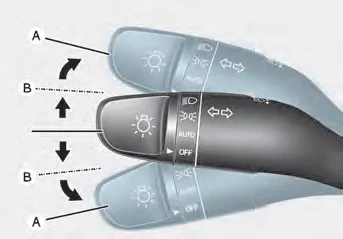
Blind-Spot View Monitor will turn on and off when the turn signal is turned on and off.
Blind-Spot View Monitor
Operating conditions
When the left or right side turn signal turns on, the image in that direction is displayed on the instrument cluster.
Off conditions
- When the turn signal turns off, the image on the instrument cluster will turn off.
- When the hazard warning flasher is on, Blind-Spot View Monitor will turn off, regardless of the turn signal status.
- When other important warning is displayed on the instrument cluster, Blind-Spot View Monitor may turn off.
System malfunction
When Blind-Spot View Monitor is not working properly, or the cluster display flickers, or the camera image does not display normally, we recommend that the system be inspected by an authorized HYUNDAI dealer.
WARNING
- The image shown on the cluster may differ from the actual distance of the object. Make sure to directly check the vehicle's surroundings for safety.
- Always keep the camera lens clean. If the lens is covered with foreign material, it may adversely affect camera performance and Blind- Spot View Monitor may not operate normally.
Basic function Driver Attention Warning will help determine the driver's attention level by analyzing driving pattern, driving time, etc. while vehicle is being driven.
Other information:
Hyundai Santa Fe (TM) 2019-2023 Service and Repair Manual: Specifications
Specifications Smart Key Unit Items Specification Rated voltage DC 12V Operating voltage DC 9 - 16V Operating temperature -22°F to 167°F (-30°C to- 75°C) Load Max.
Hyundai Santa Fe (TM) 2019-2023 Service and Repair Manual: Special service tools
Categories
- Manuals Home
- Hyundai Santa Fe Owners Manual
- Hyundai Santa Fe Service Manual
- Fuel Delivery System
- Front Radar Unit. Repair procedures
- Automatic Transaxle Control System
- New on site
- Most important about car
