
Hyundai Santa Fe (TM): Driving your vehicle / Engine Start/Stop button
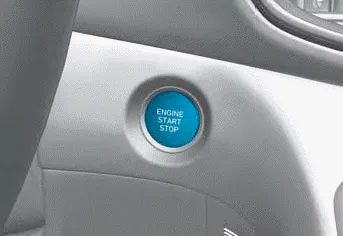
Whenever the front door is opened, the Engine Start/Stop button will illuminate and will go off 30 seconds after the door is closed.
WARNING
To turn the vehicle off in an emergency:
Press and hold the Engine Start/Stop button for more than two seconds OR Rapidly press and release the Engine Start/Stop button three times (within three seconds).
If the vehicle is still moving, you can restart the vehicle without depressing the brake pedal by pressing the Engine Start/Stop button with the gear in the N (Neutral) position.
WARNING
- NEVER press the Engine Start/Stop button while the vehicle is in motion except in an emergency. This will result in the vehicle turning off and loss of power assist for the steering and brake systems. This may lead to loss of directional control and braking function, which could cause an accident.
- Before leaving the driver’s seat, always make sure the gear is in the P (Park) position, set the parking brake, press the Engine Start/Stop button to the OFF position, and take the Smart Key with you. Unexpected vehicle movement may occur if these precautions are not followed.
- NEVER reach through the steering wheel for the Engine Start/Stop button or any other control while the vehicle is in motion. The presence of your hand or arm in this area may cause a loss of vehicle control resulting in an accident.
Engine Stop/Start button positions

Starting the engine
WARNING
- Always wear appropriate shoes when operating your vehicle. Unsuitable shoes, such as high heels, ski boots, sandals, flipflops, etc., may interfere with your ability to use the brake and accelerator pedals.
- Do not start the vehicle with the accelerator pedal depressed. The vehicle can move which can lead to an accident.
- Wait until the engine rpm is normal. The vehicle may suddenly move if the brake pedal is released when the rpm is high.
Information
- The vehicle will start by pressing the Engine Start/Stop button, only when the smart key is in the vehicle.
- Even if the smart key is in the vehicle, and when it is far away from the driver, the engine may not start.
- When the Engine Start/Stop button is in the ACC or ON position,
if any door is open, the system checks for the smart key. When the smart key
is not in the vehicle, the “
 � indicator
will blink and the warning 'Key not in vehicle' will come on. When all doors
are closed, the chime will also sound for about 5 seconds. Keep the smart key
in the vehicle.
� indicator
will blink and the warning 'Key not in vehicle' will come on. When all doors
are closed, the chime will also sound for about 5 seconds. Keep the smart key
in the vehicle.
Starting the gasoline engine
1. Always carry the smart key with you.
2. Make sure the parking brake is applied.
3. Make sure the shift button is in P(Park).
4. Depress the brake pedal.
5. Press the Engine Start/Stop button.
Information
- Do not wait for the engine to warm up while the vehicle remains stationary. Start driving at moderate engine speeds. Steep accelerating and decelerating should be avoided.
- Always start the vehicle with your foot on the brake pedal. Do not depress the accelerator while starting the vehicle. Do not race the engine while warming it up.
NOTICE
To prevent damage to the vehicle:
- If the engine stalls while you are in motion, do not attempt to shift the gear to the P (Park) position. If traffic and road conditions permit, you may put the gear in N (Neutral) while the vehicle is still moving and press the Engine Start/Stop button in an attempt to restart the engine.
- Do not push or tow your vehicle to start the vehicle.
NOTICE
To prevent damage to the vehicle:
Do not press the Engine Start/Stop button for more than 10 seconds except when the stop lamp fuse is blown.
When the stop lamp fuse is blown, you cannot normally start the engine. Replace the fuse with a new one. If you are not able to replace the fuse, you can start the engine by pressing and holding the Engine Start/Stop button for 10 seconds with the Engine Start/ Stop button in the ACC position.
For your safety always depress the brake pedal before starting the vehicle.
Emergency starting
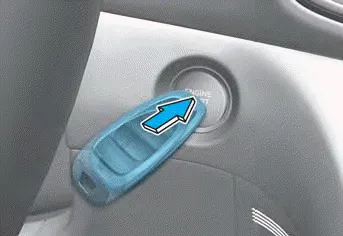
If the smart key battery is weak or the smart key does not work correctly, you can start the vehicle by pressing the Engine Start/Stop button with the smart key in the direction of the picture above.
Turning off the engine
1. Stop the vehicle and depress the brake pedal fully.
2. Make sure the shift button is in P(Park).
3. Press the Engine Start/Stop button to the OFF position and apply the parking brake.
Remote start
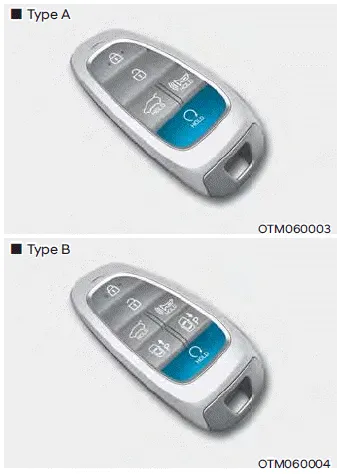
You can start the vehicle using the Remote Start button of the smart key.
To start the vehicle remotely:
1. Press the door lock button within 10 m (32 feet) from the vehicle.
2. Press the remote start ( ) button for over 2 seconds within 4 seconds after locking the doors. The hazard warning lights will blink.
3. To turn off the remote start function, press the remote start ( ) button once.
- The remote start ( ) button may not operate if the smart key is not within 10 m (32 feet).
- The vehicle will not remotely start if the engine hood or liftgate is opened.
- The vehicle must be in P (Park) for the remote start function to start.
- The engine turns off if you get in the vehicle without a registered smart key.
- The engine turns off if you do not get in the vehicle within 10 minutes after remotely starting the vehicle.
- Do not idle the engine for a long period.
WARNING To reduce the risk of SERIOUS INJURY or DEATH, take the following precautions: NEVER allow children or any person who is unfamiliar with the vehicle to touch the ignition switch or related parts.
If your vehicle is parked and the engine is left on for a long period of time, the engine will turn off automatically to help reduce fuel consumption and prevent accidents caused by carbon dioxide poisoning.
Other information:
Hyundai Santa Fe (TM) 2019-2023 Service and Repair Manual: Power Door Mirrors
Components and components location Component Location 1. Power door mirror 2. Power door mirror switch 3. Power folding mirror switch Power Door Mirror Switch. Schematic diagrams Circuit Diagram Power Door Mirror Switch.
Hyundai Santa Fe (TM) 2019-2023 Service and Repair Manual: Compressor. Repair procedures
Removal 1. If a compressor is available, the air conditioner is operated for a few minutes in the engine idle state and then the engine is stopped. 2. Disconnect the negative (-) battery terminal.
Categories
- Manuals Home
- Hyundai Santa Fe Owners Manual
- Hyundai Santa Fe Service Manual
- Engine Control/Fuel System
- Power Tailgate Module
- Electronic Parking Brake (EPB)
- New on site
- Most important about car
