
Hyundai Santa Fe (TM): Driving Convenience / Lane Following Assist (LFA)
Lane Following Assist is designed to help detect lane markings and/or vehicles on the road, and assists the driver’s steering to help center the vehicle in the lane.
Detecting sensor
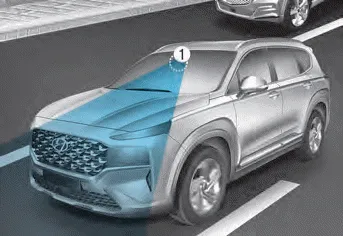
[1] : Front view camera
The front view camera is used as a detecting sensor to help detect lane markings and vehicles in front. Refer to the picture above for the detailed location of the detecting sensor.
CAUTION
For more details on the precautions of the front view camera, refer to “Forward Collision-Avoidance Assist (FCA)� section in chapter 7.
System settings
Setting functions for the system
Turning the system ON/OFF
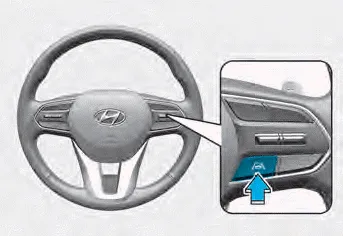
With the engine on, shortly press the Lane Driving Assist button located on the
steering wheel to turn on Lane Following Assist. The white or green
 indicator light will illuminate on
the cluster.
indicator light will illuminate on
the cluster.
Press the button again to turn off the system.
If the engine is restarted, Lane Following Assist will maintain the last setting.
Warning Volume
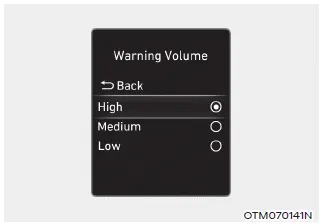
With the engine on, select ‘Driver Assistance → Warning Volume’ from the Settings menu to change the Warning Volume to ‘High’, ‘Medium’ or ‘Low’ for Hands-off warning.
If you change the Warning Volume, the Warning Volume of other Driver Assistance systems may change.
System operation
Warning and control
Lane Following Assist
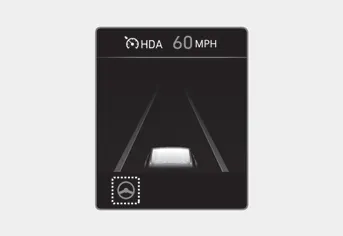
If the vehicle ahead and/or both lane markings are detected and your vehicle
speed is below 110 mph (180 km/h), the green
 indicator light will illuminate on
the cluster, and the system will help center the vehicle in the lane by assisting
the steering wheel.
indicator light will illuminate on
the cluster, and the system will help center the vehicle in the lane by assisting
the steering wheel.
CAUTION
When the steering wheel is not assisted, the green
 indicator light will blink and change
to white.
indicator light will blink and change
to white.
Hands-off warning
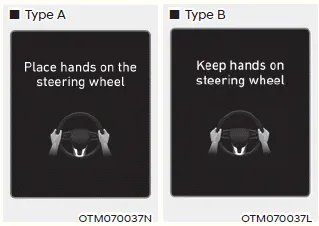
If the driver takes their hands off the steering wheel for several seconds, the ‘Place hands on the steering wheel’ (or ‘Keep hands on the steering wheel’) warning message will appear and an audible warning will sound in stages.
First stage : Warning message
Second stage : Warning message (red steering wheel) and audible warning
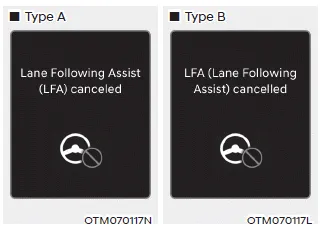
If the driver still does not have their hands on the steering wheel after the hands-off warning, the ‘Lane Following Assist (LFA) canceled’ (or ‘LFA (Lane Following Assist) cancelled’) warning message will appear and Lane Following Assist will be automatically canceled.
WARNING
- Lane Following Assist does not operate at all times. It is the responsibility of the driver to safely steer the vehicle and to maintain the vehicle in its lane.
- The hands–off warning message may appear late depending on road conditions. Always have your hands on the steering wheel while driving.
- If the steering wheel is held very lightly the hands–off warning message may appear because the system may not recognize that the driver has their hands on the steering wheel.
- If you attach objects to the steering wheel, the hands-off warning may not work properly.
Information
- You may change settings from the instrument cluster (User Settings) or infotainment system (Vehicle Settings), whichever option that is provided with your vehicle. For more details, see "User Settings" section in chapter 4, or "Vehicle Settings" section in supplied Infotainment Manual.
- When both lane markings are detected, the lane lines on the cluster
will change from grey to white.
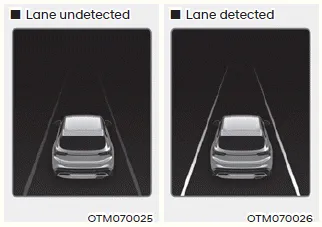
- If lane markings are not detected, steering wheel control by Lane Following Assist can be limited depending on whether a vehicle is in front or the driving conditions of the vehicle.
- Even though the steering is assisted by Lane Following Assist, the driver may control the steering wheel.
- The steering wheel may feel heavier or lighter when the steering wheel is assisted by Lane Following Assist than when it is not.
System malfunction and limitations
System malfunction
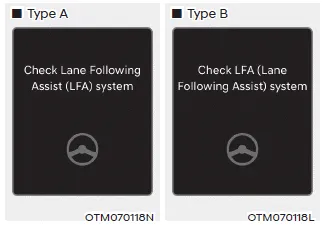
When Lane Following Assist is not working properly, the ‘Check Lane Following Assist (LFA) system’ (or ‘Check LFA (Lane Following Assist) system’) warning message will appear on the cluster. If this occurs, we recommend that the system be inspected by an authorized HYUNDAI dealer.
Limitations of the system
For more details on system limitations, refer to “Lane Keeping Assist (LKA)� section in chapter 7.
WARNING
For more details on the system precautions, refer to “Lane Keeping Assist (LKA)� section in chapter 7.
Navigation-based Smart Cruise Control will help automatically adjust vehicle speed when driving on highways (or motorways) by using road information from the navigation system while Smart Cruise Control is operating.
Highway Driving Assist is designed to help detect vehicles and lanes ahead, and help maintain distance from the vehicle ahead, maintain the set speed, and help center the vehicle in the lane while driving on the highway (or motorway).
Other information:
Hyundai Santa Fe (TM) 2019-2023 Service and Repair Manual: Smart Key Unit. Components and components location
Hyundai Santa Fe (TM) 2019-2023 Service and Repair Manual: Smart Cruise Control (SCC) Switch. Repair procedures
Inspection 1. Check for resistance between terminals in left switch position. [Audio/Bluetooth] Switch Connector terminal Resistance (± 3%) SEEK Up 1 - 6 430 Ω
Categories
- Manuals Home
- Hyundai Santa Fe Owners Manual
- Hyundai Santa Fe Service Manual
- Engine Electrical System
- Blower
- Automatic Transaxle Control System
- New on site
- Most important about car
