
Hyundai Santa Fe (TM): Body Electrical System / Electro Chromic Inside Rear View Mirror
Description and operation
| Description |
| 1. |
The forward facing sensor sees if the brightness of the surroundings
is low enough for the mirror to operate its function.
|
| 2. |
The rearward looking sensor detects glaring of the reflecting light
from a vehicle behind.
|
| 3. |
The ECM is darkened to the level as determined by the rearward looking
sensor. When the glaring is no longer detected, the mirror stops functioning.
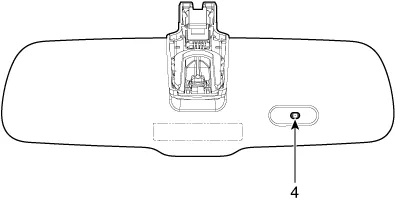
(1. LED indicator , 2. ON/OFF Switch , 3. Rearward looking sensor ,
4. Forward looking sensor )
|
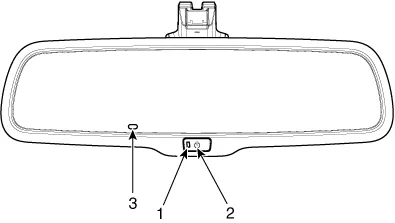
| Automatic-dimming Function |
| 1. |
Pressing and holding the Feature Control button for more than 3 but
less than 6 seconds turns the auto-dimming function OFF which is indicated
by the green Status Indicator LED turning off.
|
| 2. |
Pressing and holding the Feature Control button again for more than
3 but less than 6 seconds turns the auto-dimming function ON which is
indicated by the green Status Indicator LED turning on.
|

Components and components location
| Components |
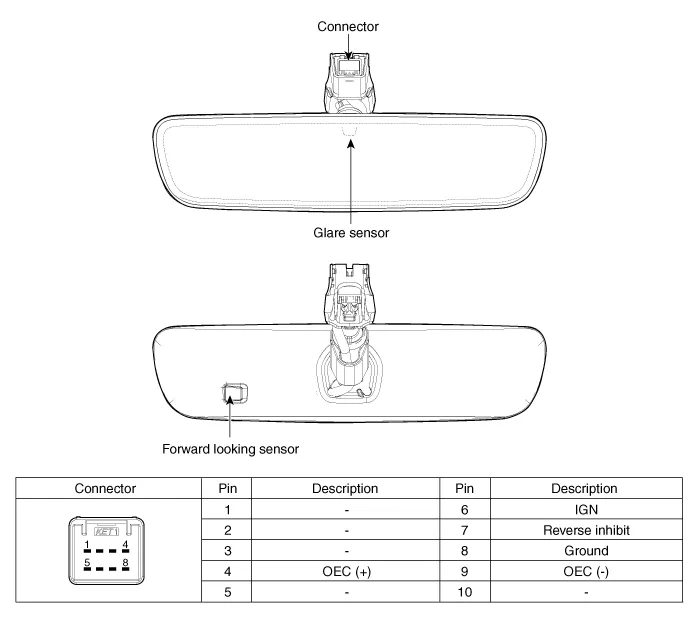
Repair procedures
| Inspection |
| 1. |
Turn the ignition key to the "ON" position.
|
| 2. |
Cover the forward facing sensor.
|
| 3. |
Head a light to the rearward looking sensor.
|
| 4. |
The ECM should be darkened as soon as the rearward looking sensor detects
the light.
|
| 5. |
When the reverse gear is engaged, the ECM should not be darkened.
When heading lights to both the forward facing and rearward looking
sensors, the ECM should not be darkened.
|
| Removal |
| 1. |
Disconnect the negative (-) battery terminal.
|
| 2. |
Remove the mirror wiring cover (A) and (B).
|
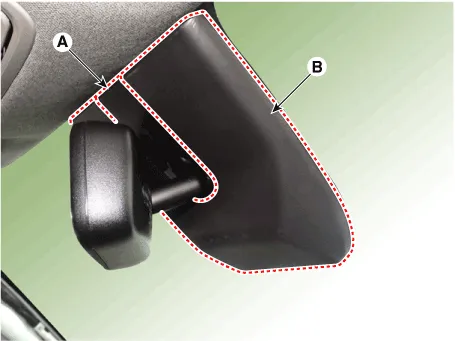
| 3. |
Remove the mirror mounting screw and connector (A).
|
| 4. |
Remove the mirror pulling up in the arrow direction.
|
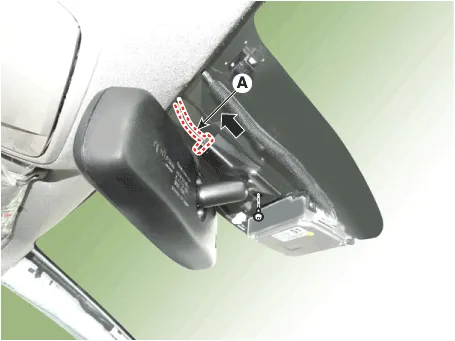
| Installation |
| 1. |
Install the mirror making sure the mounting bracket not to be damaged.
|
| 2. |
Install the mirror wiring cover after reconnecting the connector and
tightening the screw.
|
Components and components location Component Location 1. Rear wiper arm nut 2. Rear wiper arm & blade 3.
Components and components location Component Location 1. Panorama sunroof 2. Panorama sunroof switch 3. Panorama sunroof motor & controller 4.
Other information:
Hyundai Santa Fe (TM) 2019-2023 Service and Repair Manual: Power Tailgate Module
Description and operation Description Power tailgate is an electro-mechanical system designed to provide power opening and closing of the tailgate through the push of a button of a remote key (fob), console switch, inner switch or an outside handle switch of the tailgate.
Hyundai Santa Fe (TM) 2019-2023 Service and Repair Manual: Driver Parking Assistance System
Desctiprion and operation Description ADAS_PRK is a unit that controls the functions required for ADAS parking. If the ADAS_PRK is applied, the parking distance warning function is also controlled by the ADAS_PRK. System Function Parking Collision-Avoidance Assist (PCA) PCA is a parking safety system
Categories
- Manuals Home
- Hyundai Santa Fe Owners Manual
- Hyundai Santa Fe Service Manual
- Power Tailgate Module
- Engine Control/Fuel System
- Parking Brake System. Electronic Parking Brake (EPB)
- New on site
- Most important about car
