
Hyundai Santa Fe (TM): Head Up Display System / Description and operation
Hyundai Santa Fe (TM) 2019-2023 Service and Repair Manual / Body Electrical System / Head Up Display System / Description and operation
| Description |
| 1. |
System operation
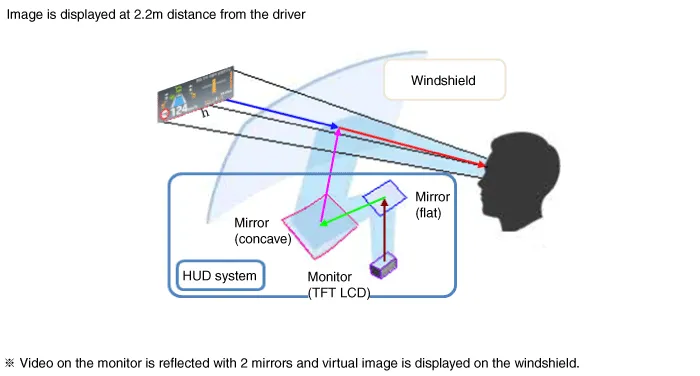
HUD system displays various information on the windshield glass which
minimizes the driver’s eye movement to enhance safety and convenience.
The Head Up Display reflects the TFT LCD images to two mirrors (flat/concave)
and displays them 2.2m ahead from the driver's eye.
Information provided by HUD ;
|
| 2. |
HUD Display Contents
|
| 3. |
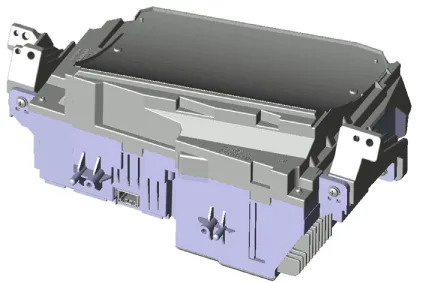
HUD Unit
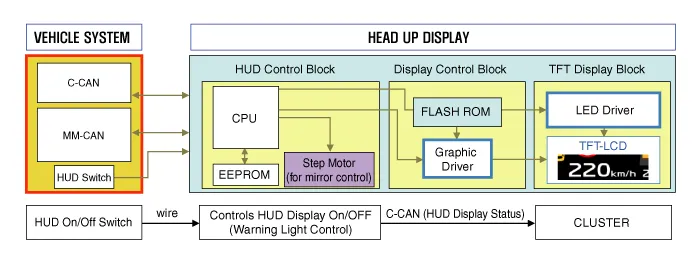
Head Up Display : Information of the vehicle system is output to the
combine through CAN communication.
|
| 4. |
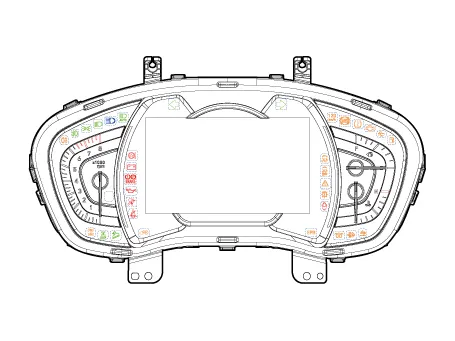
Cluster
|
| 5. |
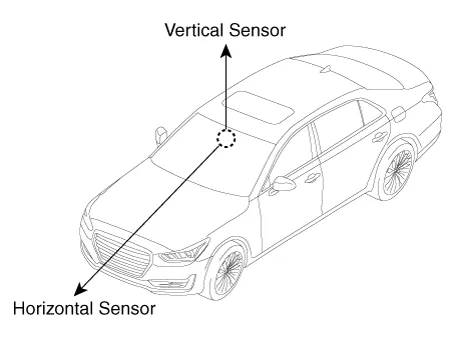
Ambient Light Sensor
Ambient light sensor: The two-direction (horizontal, vertical) measuring
sensor is applied and the HUD brightness is adjusted by the horizontal
measurements.
|

Components Location 1. Head Up Display (HUD) 2. Rain(Light) sensor 3. Cluster (User setting menu On/Off)
Other information:
Hyundai Santa Fe (TM) 2019-2023 Service and Repair Manual: Mode Control Actuator. Components and components location
Hyundai Santa Fe (TM) 2019-2023 Service and Repair Manual: Parking Collision-Avoidance Assist (PCA). Repair procedures
Removal Parking Collision-Avoidance Assist (PCA) Unit 1. Disconnect the negative (-) battery terminal. 2. Remove the ADAS PRK Unit. (Refer to Advanced Driver Assistance System (ADAS) - "Driver Parking Assistance System") Parking Collision-Av
Categories
- Manuals Home
- Hyundai Santa Fe Owners Manual
- Hyundai Santa Fe Service Manual
- Engine Mechanical System
- Seats & Safety System
- Forward Collision-Avoidance Assist Settings
- New on site
- Most important about car

Copyright © 2025 www.hsafe4.com - 0.0174