
Hyundai Santa Fe (TM): Audio / USB Jack. Repair procedures
Hyundai Santa Fe (TM) 2019-2023 Service and Repair Manual / Body Electrical System / Audio / USB Jack. Repair procedures
| Removal |
|

|

| 1. |
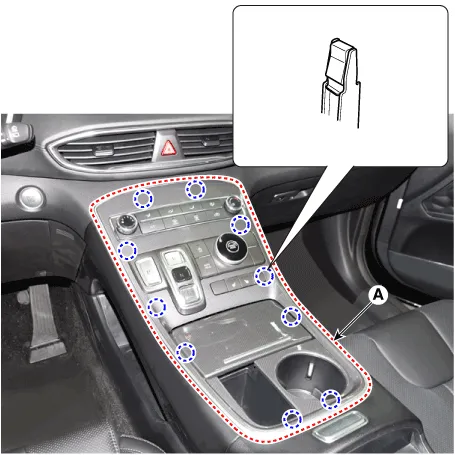
Remove the console upper cover (A).
|
| 2. |
Press the lock pin, separate the connectors (A).
|

| 3. |
Remove the cup holder assembly (A) after loosening mounting screws.
|

| 4. |
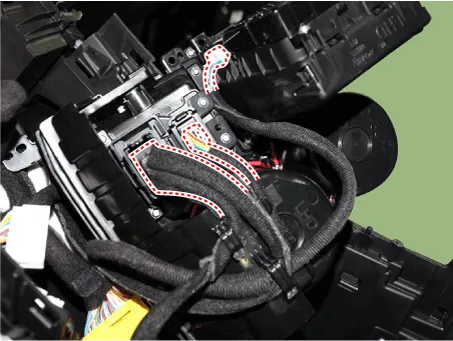
Disconnect WPC, USB, WPC lamp connectors.
|
| 5. |
Remove the USB (A) by pushing the fixed clip in the direction of the
arrow as lillustration below.
|

| Installation |
| 1. |
Install the USB.
|
| 2. |
Install the cup holder assembly.
|
| 3. |
Install the floor console upper cover.
|
| 4. |
Connect the negative (-) battery connector.
|
Circuit Diagram
Other information:
Hyundai Santa Fe (TM) 2019-2023 Service and Repair Manual: Lane Safety Button. Repair procedures
Removal 1. Disconnect the negative (-) battery terminal. 2. Remove the crash pad lower pannel. (Refer to Body - "Crash Pad Lower Panel") 3. Loosen the mounting screw and remove the crash pad garnish [LH] (A).
Hyundai Santa Fe (TM) 2019-2023 Service and Repair Manual: Remote Smart Parking Assist (RSPA). Repair procedures
Removal ADAS Parking ECU (ADAS_PRK) 1. Disconnect the negative (-) battery terminal. 2. Remove the ADAS Parking ECU (ADAS_PRK). (Refer to Advanced Driver Assistance System (ADAS) - "ADAS Parking ECU (ADAS_PRK)") Parking/View switch
Categories
Copyright © 2025 www.hsafe4.com - 0.017